Kurzantwort und Kaufhinweis ergänzt
Contents(11)
- 1Why organic is so important
- 2How to find the bio on TikTok (iPhone & Android)
- 3„Link in the bio“ - what does that mean?
- 4Step-by-step: Adding a website to TikTok Bio
- 5Text ideas for your TikTok biography (can be copied)
- 6Typical Tiktok Bio errors (and quick fixes)
- 7How to optimize „Link in TikTok Bio“ for more clicks
- 8Finding (and correctly reading) the bio from others
- 9Professional tips for creators & small businesses
- 10Frequently asked questions (FAQ)
- 11Brief summary
Why organic is so important
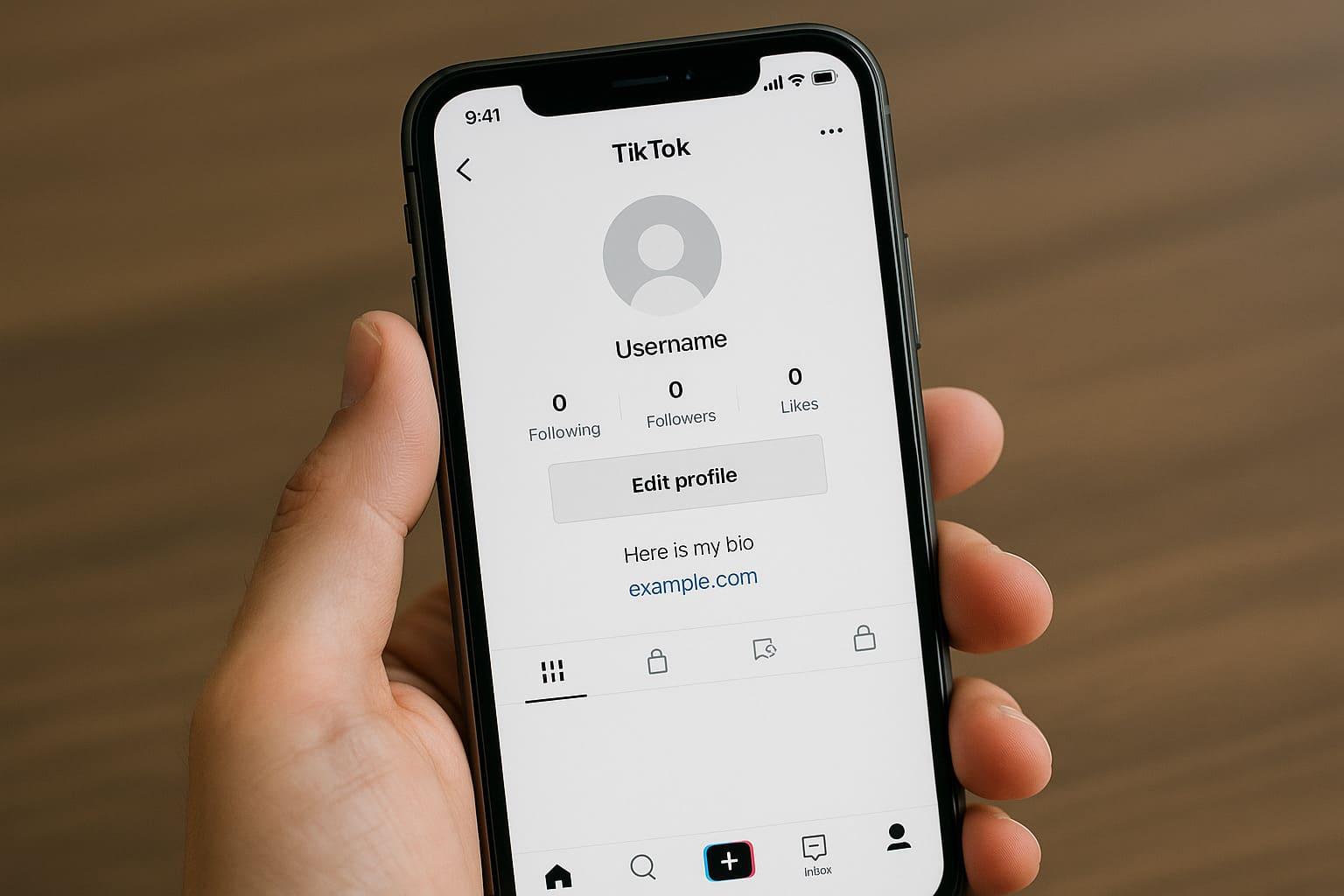
You ask yourself: „where is the bio at tiktok“ and how to use them sensibly? In short: The TikTok biography (short: Organic) is the small text under your name on your profile. There you explain in 1-2 sentences who you are, what your videos offer - and you can add a Insert link in TikTok Bio (e.g. to store, website, link tree). This is where it is often decided whether people follow you or keep scrolling.
How to find the bio on TikTok (iPhone & Android)
- Open TikTok
- down on Profile type
- Edit profile tap
- Field Organic - Here you write your text
- Save - ready, the TikTok biography appears directly under your user name
Tip: Write clearly and concisely. Use emojis sparingly (e.g. ✅📍) to highlight important things.
„Link in the bio“ - what does that mean?
"Link in the bio“ means: You set a clickable Website link directly in your profile. This is worth its weight in gold if you:
- on Website, store or newsletter want to manage,
- Services (appointment, contact),
- or several destinations via Link tools (Linktree, Beacons, Campsite).
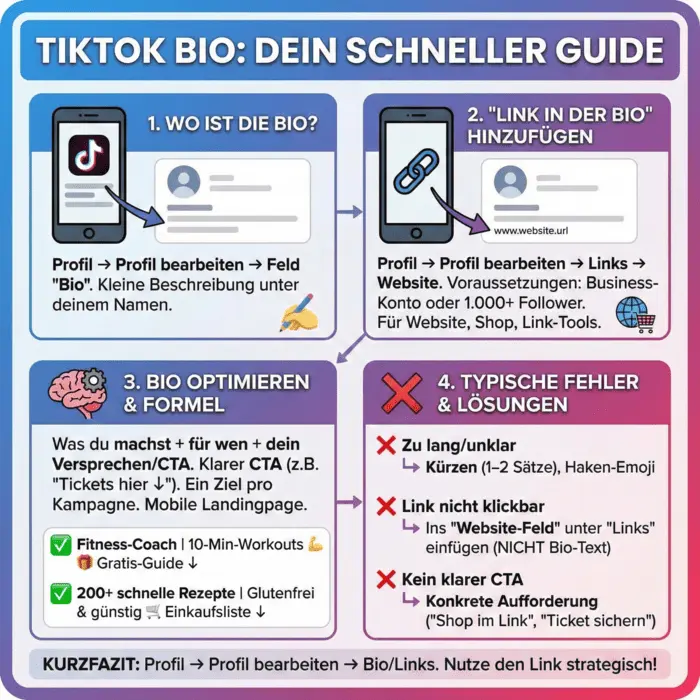
The Website link has its own rules on TikTok: Officially, you add it via Profile → Edit profile → Links → Website added. Depending on the account type, you will need 1,000 followers or a registered business account (company account). Source & instructions („Profile → Links → Add“ and requirements) can be found here directly at TikTok. TikTok Support
Step-by-step: Adding a website to TikTok Bio
Abstract: Profile → Edit profile → Links → Website → Enter URL → Save.
If you want to use the Links yet, it may be due to the fact that:
- your account (still) No business account is or
- you as Creator under 1,000 followers have.
In both cases, switching to Business - then the Website field usually ready immediately. TikTok describes how to change the account type here (official guide; language: ES, but the sequence of steps is clear).
Text ideas for your TikTok biography (can be copied)
- Who are you + benefits:
„Fitness coach | 10-minute workouts for at home 💪“ - Call-to-action:
„🎁 Free guide in the link ↓“ - Social Proof / Niche:
„200+ quick recipes | gluten-free & affordable“
Formula: What you do + For whom + your promise/CTA.
Typical Tiktok Bio errors (and quick fixes)
Error 1: Bio is too long or unclear
→ Shortly on 1-2 sentences. A hook emoji for the benefit, arrow to the link.
Error 2: No space for website
→ Check Business account or 1,000-follower limit (see official help). TikTok Support
Error 3: Link not clickable
→ The clickable Link belongs in the Website field under Links, not in the bio text.
Error 4: No clear CTA
→ Write specifically: „🎟️ Tickets here“, „🛒 Shop in the link“, „📬 Save newsletter“.
How to optimize „Link in TikTok Bio“ for more clicks
1) One goal per campaign
Store today? Then write: „New: Winter-Drop ❄️ - in the link“.
Newsletter tomorrow? Then customize Bio & CTA.
2) Use short URLs
Clean, short links appear trustworthy and are easier to read.
3) Think landing page mobile
The majority comes from mobile. Large buttons, little text, clear next steps.
4) Test 2-3 variants
Change CTA word („Save now“ vs. „Get for free“), Emoji and Sequence. Make a note of what works better.
Finding (and correctly reading) the bio from others
- Open the Profile of the person.
- Under the name you will see the TikTok biography (short text).
- Directly below (if available) a clickable website link.
Important: Not every profile shows a link - this depends on the account type and authorization (see TikTok Help).
Professional tips for creators & small businesses
A) Organic like a mini landing page
- Line 1: What do you offer?
- Line 2: Social proof/keyword
- Line 3: CTA + arrow ↓ to the link
B) Uniform branding
Use in Name, picture, bio the same keywords and colors. This way, new visitors will recognize you immediately.
C) Adapt seasonally
Promotions, drops, events? Bio & Link update weekly.
D) Don't forget the legal aspects
When you advertise products, pay attention to Labeling (e.g. „advertising“/„ad“) where necessary - especially in posts/videos.
Frequently asked questions (FAQ)
I can't find the website field. What can I do?
Switch to Business account or reach 1,000 followers. After that: Profile → Edit profile → Links → Website. Official guide: TikTok support.
Do I have to pay for the business account?
No. Switching is free of charge. TikTok explains the steps for switching here (official).
Can I set multiple links?
In the profile there are a Website field. Use Link tools (e.g. link tree) in order to link several destinations to one side.
How to write a good TikTok biography
Clear, short, benefit-oriented. Example: „Quick meal prep recipes | 5 ingredients | 🛒 Shopping lists in the link“.
Is the bio text limited?
Yes, it is kept short. Formulate precise and use abbreviations/emojis sparingly.
Brief summary
where is the bio at tiktok? → Profile → Edit profile → Bio.
Add a link in the bio? → Profile → Links → Website (business account or from 1,000 followers). How to direct visitors cleanly to Website or Store. Official details: TikTok support.
Bigfollow
Social media team
BigFollow is the social media shop of PortalWeb GmbH in Altdorf, Switzerland. Since 2022 we have delivered followers, likes and views with a focus on quality so that profiles really grow. Our social media team writes the guides and tutorials on the blog.
Learn more about Bigfollow