
Contents(7)
- 1The TikTok phenomenon: Why your internet credit is suddenly gone
- 2The hard truth: How much mobile data does TikTok use per hour?
- 3TikTok Live: The secret data guzzler in the feed
- 4Field report: When my Internet suddenly disappeared on the train
- 55 ingenious tips: How to save data volume with TikTok
- 6Frequently asked questions from our readers about Internet usage (FAQ)
- 7In a nutshell: the most important things for your next session
The TikTok phenomenon: Why your internet credit is suddenly gone
Do you know this? You're on the bus, you're bored and you just want to watch a few funny videos «for a minute». You open the app, scroll through the for-you feed and, bang - 45 minutes have passed. But in addition to time flying by, something else is also shrinking rapidly: your mobile internet. Have you ever asked yourself at a time like this? how much data volume does tiktok consume really?
You're not alone. Millions of users experience that moment of shock every month when the dreaded text message from their mobile provider arrives: «You've used 80% of your data allowance.» TikTok is undoubtedly one of the most entertaining apps on our smartphones, but it's also technically a huge vacuum cleaner of megabytes.
In this article, we take a close look at the popular app. I'll show you simply and clearly how many megabytes (MB) or gigabytes (GB) the short clips really eat up. You'll also find out how you can effectively counteract this on your smartphone without having to miss out on the fun. Let's dive straight into the bare figures!
The hard truth: How much mobile data does TikTok use per hour?
When we ask ourselves the question, how much mobile data does tiktok use, we must first look at the technology behind it. In contrast to text messages or simple websites, TikTok continuously loads high-resolution videos.
Before you even swipe down, the app is already pre-loading the next video and the one after that in the background. This so-called «pre-loading» ensures that you have no loading times. However, the price you pay for this is your data volume.
Here is the average consumption at a glance:
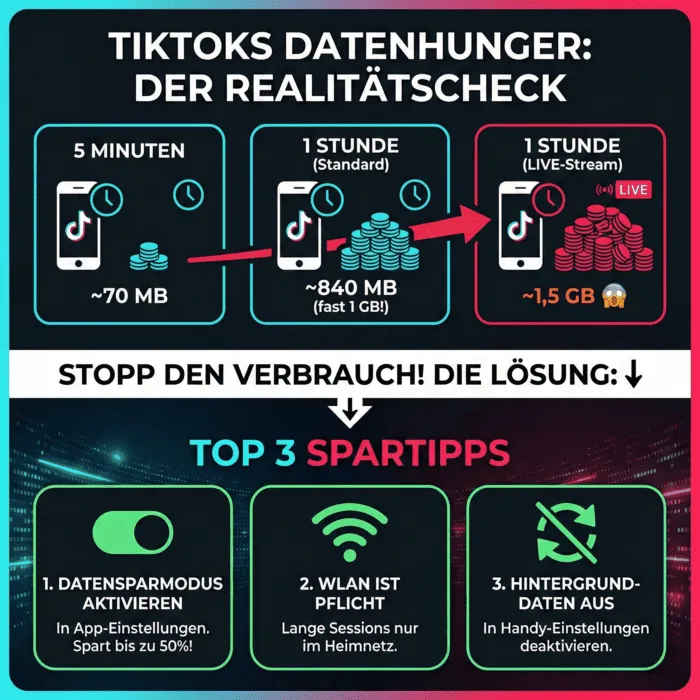
- 5 minutes of use: approx. 70 megabytes (MB)
- 15 minutes of use: approx. 210 megabytes (MB)
- 30 minutes of use: approx. 420 megabytes (MB)
- 1 hour of use: approx. 840 megabytes (MB)
Yes, you read correctly: per hour you use almost a whole gigabyte (GB)! So if you watch 20 minutes of TikTok every day on the way to work, during your lunch break and on the couch in the evening, that's one hour a day. That adds up to around 25 gigabytes a month - just for a single app!
A good comparison: Experts from leading mobile providers often explain that video streaming is the most intensive form of data usage. You can read more about this in Deutsche Telekom's informative guide to data consumption when streaming video, which explains the correlation between video quality and data consumption very well.
The difference between viewing and uploading
Maybe you're not just a silent viewer, but also upload your own dances, vlogs or comedy sketches. You should be aware of this: Uploading your own videos often consumes even more data at once than simply watching them.
A 60-second video that you have recorded with your smartphone's high-resolution camera can quickly consume 50 to 100 MB of your data volume in one go when uploading. So if you're a creator, it's best to always upload your masterpieces via your home Wi-Fi.
TikTok Live: The secret data guzzler in the feed
In addition to the short clips, there is a function that is even hungrier. Many users rightly ask themselves: how much data volume does tiktok consume Actually, if I have a live-stream?
Live videos are technically more demanding than pre-recorded clips. As the data is transmitted in real time, the app cannot compress the videos as much (i.e. «miniaturize» them). This means that the full data load lands directly on your mobile connection.
When you're watching one of your favorite creators in a live stream, chatting and maybe even sending digital gifts, consumption skyrockets. With a Live-stream, you can assume a consumption of about 1.2 to 1.5 gigabytes. per hour go out. If you watch the stream in particularly high quality, this value can even scratch the 2 gigabyte mark. So extreme caution is advised here if you don't have unlimited data.
Field report: When my Internet suddenly disappeared on the train
So that the whole thing doesn't just remain theoretical, I'd like to tell you a short story. The whole thing happened to me last summer. I was on a regional train that was winding its way through the mountains. The journey was supposed to take two hours and the train's WiFi was down (again).
What do you do? Right, headphones on and TikTok on. I was only halfway through the month and still had a good 4 gigabytes left on my 10 GB plan. So I felt safe. I watched cooking tutorials, laughed at funny animal videos and completely lost track of time.
After about an hour and a half, a message from my provider popped up on the screen. The Internet was being throttled. My 4 GB were completely used up. I couldn't even open Google Maps to get from the train station to my hotel. Since that day, I've been meticulous about how I use my save data volume when I'm on the road. I really want to spare you this stress!
5 ingenious tips: How to save data volume with TikTok
Fortunately, you are not helplessly at the mercy of the app's hunger for data. The developers are aware of the problem and have built in functions to curb consumption. Here are the best tips on how you can massively save data volume whether you are a android-cell phone or a iphone owns.
1. activate the integrated data saving mode
This is the absolutely most important step. TikTok offers its own mode that slightly reduces the resolution of the videos and stops the aggressive «pre-loading». This means you use up to 50% less data when scrolling!
This is how it works on iPhone and Android:
- Open TikTok and go to your profile (bottom right).
- Tap on the three lines (the menu) at the top right.
- Select «Settings and privacy».
- Scroll down to the «Cache and mobile data» section and tap on «Data saver».
- Flip the switch. Done!
If you are looking for more technical details on how this mode affects quality, the official Help page from TikTok on the data saver further. This is an absolutely trustworthy source directly from the developers of the app.
2. switch off background refresh
Even if you don't have the app open, it often downloads new content so that it is ready to go as soon as you open it.
- On the iPhoneGo to Settings > General > Background refresh and switch it off for TikTok.
- With AndroidGo to Settings > Apps > TikTok > Mobile data and deactivate background data usage.
3. wifi is your best friend
Make it a habit to only use TikTok excessively when you are connected to a WLAN. At home, in the office or with friends, the internet is usually unlimited. When you're out and about, try to keep usage to a minimum.
4. use TikTok Lite (for Android users)
If you are a Android-device, you can search for «TikTok Lite» in the Google Play Store. This version of the app is specially optimized for slower connections and lower data consumption. It looks almost exactly the same, but uses significantly less storage space and megabytes.
5. monitor your own consumption
Trust is good, control is better. Check your smartphone settings regularly to see how much the app has already used this month. On most smartphones, you can set a limit above which the phone blocks mobile data for this particular app. That way, you won't get any nasty surprises at the end of the month.
Frequently asked questions from our readers about Internet usage (FAQ)
At this point, I would like to address the most frequently asked questions that users ask us again and again. This information will help you to understand the context even better.
Does TikTok pull more data than Instagram? Yes, in most cases it does. While Instagram also offers many static images and text content, TikTok consists 100% of videos. Since videos are the biggest data drivers, consumption is often higher here than on Instagram.
Does TikTok also consume data if I watch the same video several times? No. Once a video has been fully loaded, it is stored in your phone's cache. So if you watch it in an endless loop, it won't cost you any additional data volume the second, third or fourth time.
How many GB do I need per month if I use TikTok every day? If you use TikTok for around one hour a day without the data-saving mode, you will need around 25 GB per month for this app alone. We recommend cell phone tariffs with at least 30 GB to 50 GB data volume for regular users.
Does the data-saving mode affect WLAN usage? The data saver is intelligent: it only reduces the quality when you are using mobile data. As soon as you are in Wi-Fi, TikTok automatically loads the videos again in the highest HD quality.
In a nutshell: the most important things for your next session
You now know exactly what's happening in the background of your phone as you swipe through your feed. TikTok is a fantastic app for entertainment, but it does take its toll on your internet plan.
Briefly summarized (Featured Snippet Optimization): How much data volume does TikTok use? TikTok consumes around 840 MB per hour in standard mode. With Live-streams, this value can increase to up to 1.5 GB per hour. To Save data volume, you should activate the «Data saver» in the app settings, which reduces consumption by up to 50%. This works both on the iPhone as well as on Android-devices.
Now you're all set for your next scrolling session on the train. Activate economy mode, pay attention to your surroundings and, above all, have fun watching videos!
Bigfollow
Social media team
BigFollow is the social media shop of PortalWeb GmbH in Altdorf, Switzerland. Since 2022 we have delivered followers, likes and views with a focus on quality so that profiles really grow. Our social media team writes the guides and tutorials on the blog.
Learn more about Bigfollow