
How to Recover Deleted Instagram Chats?
How to Recover Deleted Instagram Chats?

Contents6
Restore Instagram chats - That's exactly what this guide is all about. Perhaps you have accidentally deleted an important conversation or realized when moving to a new cell phone that older News missing. Don't worry: In the next few minutes, you will learn step by step how to recover deleted Instagram chats, images and data both under Android as well as on the iPhone get them back. We will look at official ways of using the Instagram app, proven backup strategies and useful tools to ensure that your digital memories are not lost.
Why do Instagram messages disappear at all?
Before we look at how you can restore a chat Instagram, it's worth taking a quick look at the causes:
- Manual deletionYou tap "Delete" in a hurry and confirm - out of sight, out of mind.
- App errorUpdates to the Instagram app can lead to faulty caches.
- Device changeWhen switching to a new cell phone, chats are often not transferred automatically.
- Account problems: Violations of guidelines can lead to the removal of individual messages.
The good news is that even if a chat seems to have disappeared, a lot of data is still available on Instagram servers or in backups - you just need to know where and how to access it.
Restore Instagram chats - the 3 most important methods
Method 1: Data download directly in the Instagram app (official & free of charge)
First things first: You cannot „get deleted chats back into the app“. With the export you get a copy of your messages outside the app (HTML or JSON) that you can read on the device/PC.
How to do it step by step (Accounts Center in the Instagram app)
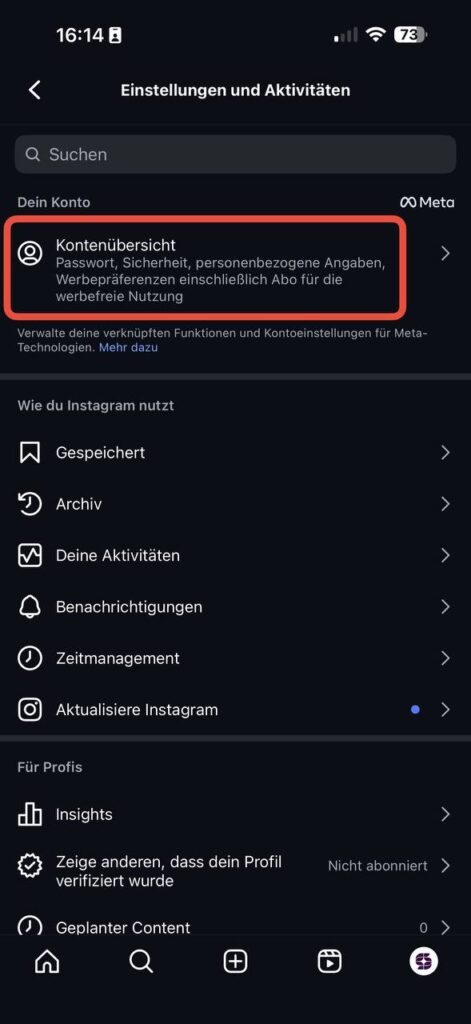
- Open Instagram → Profile → ☰ → „Settings and activities“
- „Account overview“ tap. (Image 1)
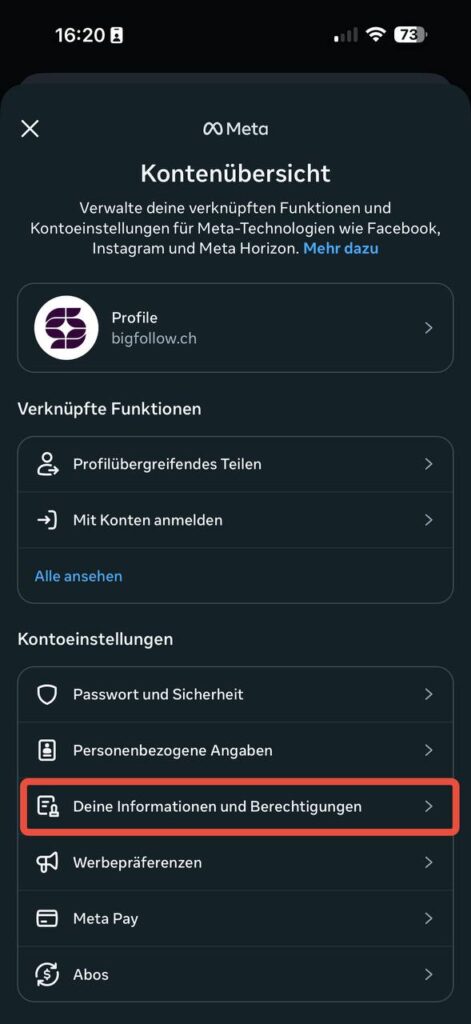
- In the meta window „Your information and authorizations“ select. (Image 2)
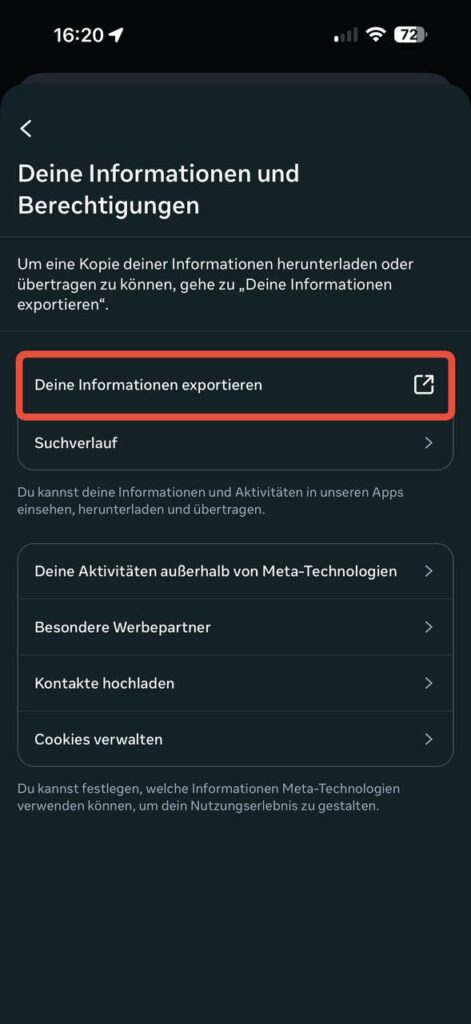
- „Export your information“ tap. (Image 3)
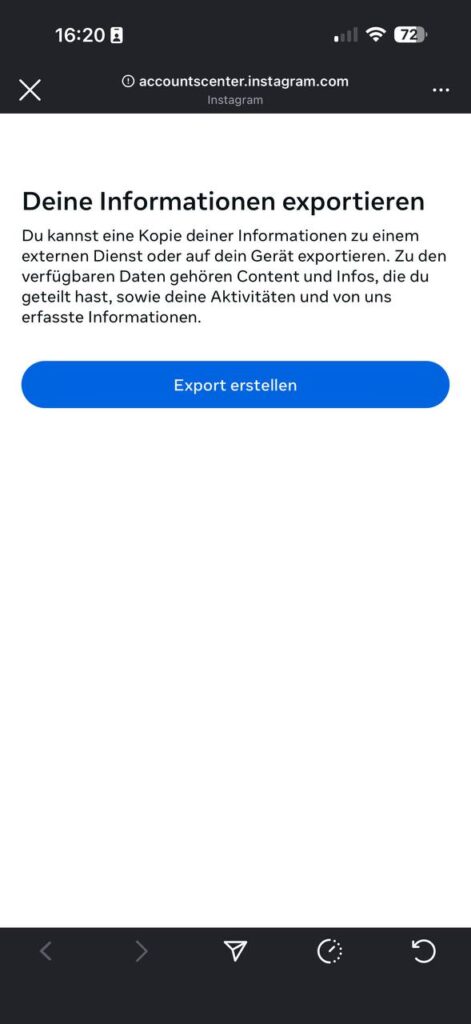
- The Accounts Center opens: „Create export“. (picture 4)
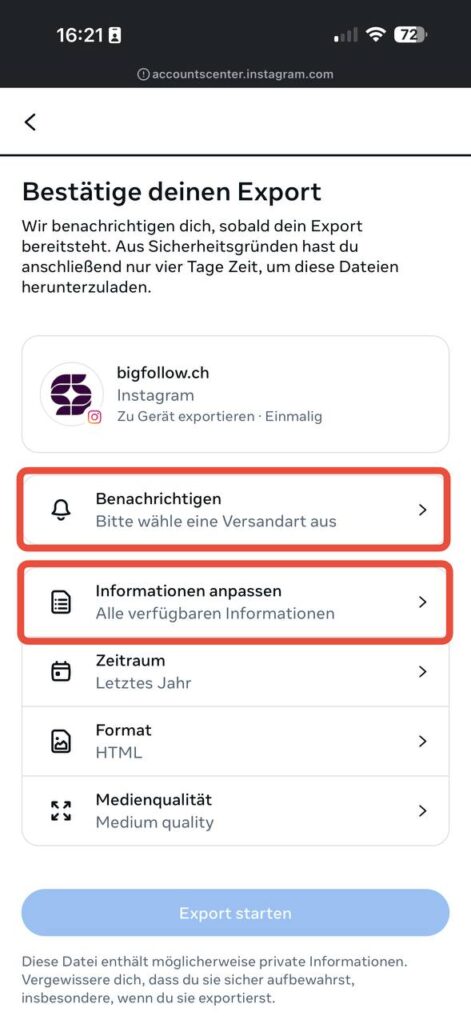
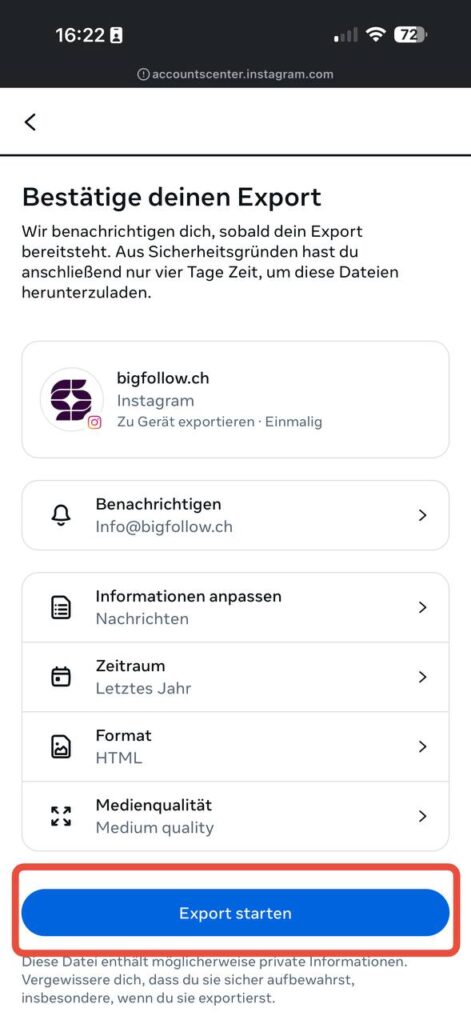
- Under „Notify“ select Email or App hint. Under „Customize information“ you determine, what is exported. (Image 5)
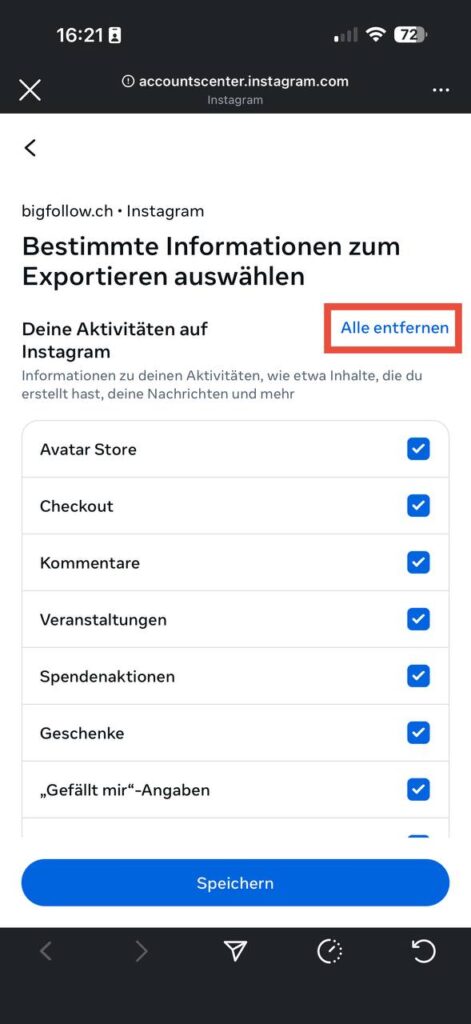
- „Remove all“ so that nothing unnecessary is left behind. (picture 6)
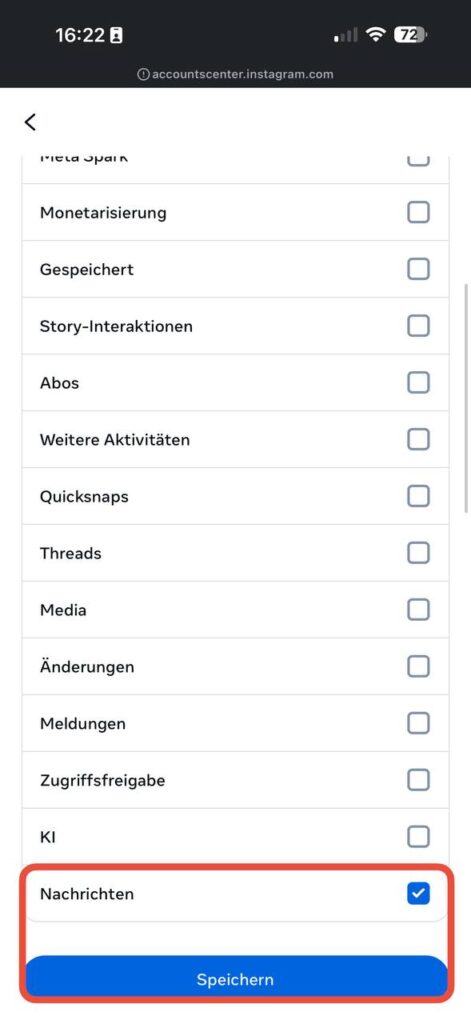
- Scroll down and only „News“ tick → Save. (picture 7)
- Back to the overview page:
- Period (e.g. „Last year“ or user-defined)
- Format: HTML (easy to read) or JSON (raw data)
- Media quality Customize optionally
→ Then „Start export“. (picture 8)
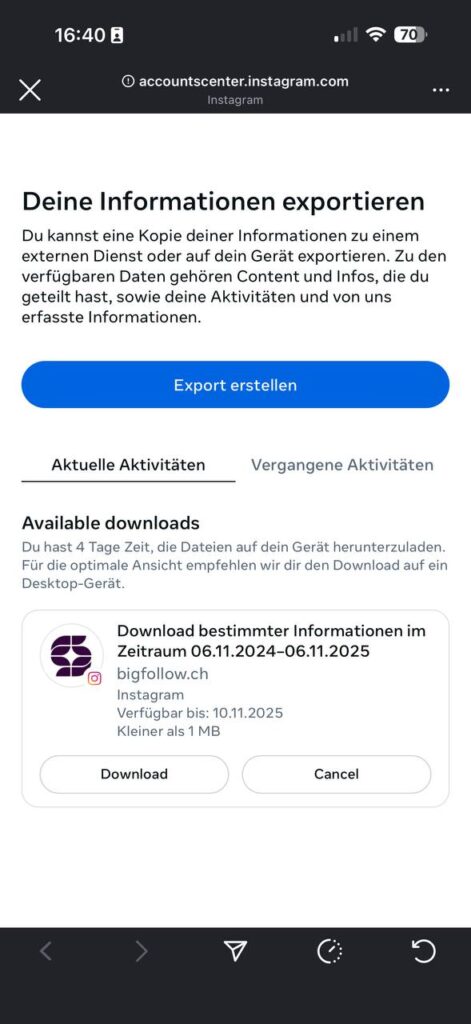
- As soon as the export is ready, it will appear under „Available downloads“ → Download. (picture 9)
- Save the ZIP file on the device and unpack. Open messages.html (for HTML export) or. messages.json (for JSON export) to view your chats. (Image 10)
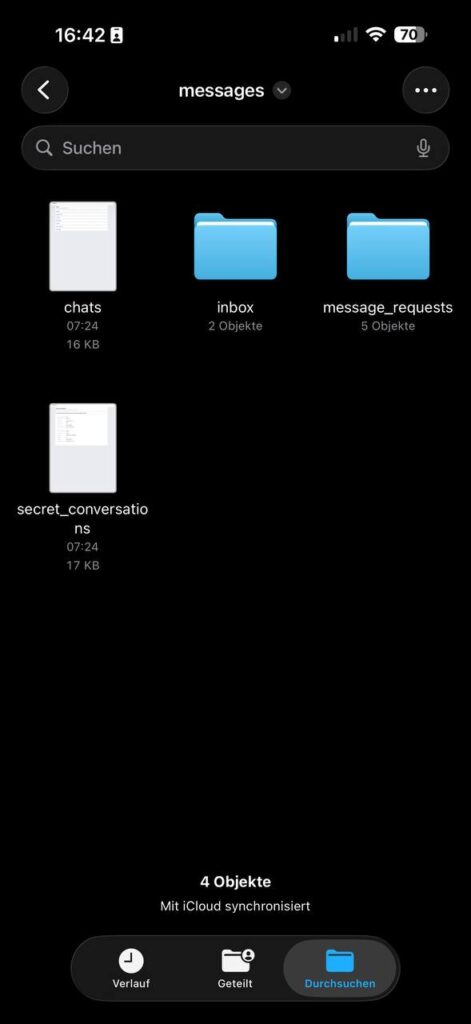
Important to know
- Download deadline: The link is only 4 days valid.
- Contents: You will see a copy of your messages (if still available on the server side) outside the app. It is not possible to return to the Instagram chat.
- Visibility: Contents are exported your Account; „Withdrawn“/„Unsend“ messages are missing.
Method 2: Cloud backup on Android and iPhone
Do you use Google Drive or iCloud? Then the chances are good that your Chats are backed up there - especially if you have activated automatic app backups.
- AndroidOpen : Open Settings → System → Backup. Set an older date before the News disappeared.
- iPhone: Go to Settings → General → Transfer/reset iPhone. Select an iCloud backup.
AttentionWhen restoring a complete device backup, current data will be overwritten. You should therefore export current photos or documents beforehand.
Method 3: Third-party software - opportunities and risks
Programs like Dr.Fone, Tenorshare or EaseUS MobiSaver promise, Recover deleted Instagram chat pictures - often with one click. You search memory areas that are no longer displayed by the app but have not yet been overwritten.
- Advantage: In some cases, lost pictures or complete images DMs again.
- DisadvantagePaid, no official support - and success is not guaranteed. Therefore, only use such tools if official methods fail and read reviews to avoid malware.
Practical example: How Ms. Müller saved her chat on a new cell phone
Ms. Müller recently switched from a Galaxy S21 to an iPhone 15. After logging in for the first time, her entire chat history with a long-time customer was missing. She followed the procedure described above Method 1:
"I discovered the data download function, had the ZIP file sent to me and within an hour I had all the data I needed. Restore Instagram chats even older product photos that I had long forgotten about."
She then imported the most important passages into a note-taking app and saved them separately in the cloud. Her conclusion: "If I had known how easy it was earlier, I would have saved myself a lot of stress."
Common mistakes and how to avoid them
- Waiting too long: The longer a file is overwritten, the more difficult it is to find a restore instagram chat to be able to. Act immediately.
- Multiple app restartsPermanent log-ins/-outs can permanently delete data from the cache.
- Untested tools: Do not download software from dubious sources; this will jeopardize your Data.
- Missing backupsEnable automatic backups on both Android and iPhone - it only takes a few minutes.
FAQ - Frequently asked questions
Can I retrieve deleted Instagram messages directly in the app?
Not in the chat view itself. You must use the data download or import a backup.
How long does Instagram store deleted messages on its servers?
Meta usually deletes messages permanently from active systems within 30 days, but keeps them in back-up systems for up to 90 days according to the data protection policy. The faster you act, the higher the chance of success.
Do the methods also work for business accounts?
Yes, data export is available for both private and company profiles.
Can I restore chats if I have lost my old phone?
Yes, as long as you know your access data. Download the Instagram app on the new cell phone, request the data download or import a cloud backup.
Is there a guarantee that third-party programs will find deleted images?
No. The degree of success depends on whether the memory blocks have already been overwritten. Use test versions before you pay.
Conclusion / Summary
If you Restore Instagram chats you should first use the official data download. This method is free, secure and often offers you more than you expect - including pictures, videos and even stickers. If you have a New cell phonecheck cloud backups for Android or iPhonebefore you use riskier software. And remember: the sooner you act, the better your chances of recovering deleted data. News successfully. In this way, you retain control of your digital dialogs - without any magic, but with clear, practicable steps.
Bigfollow
Bigfollow has been the leading Swiss provider for social media growth, follower packages, likes and engagement boosts since 2022.