
How much data volume does YouTube use - realistic values & simple saving tips
How much data volume does YouTube use - realistic values & simple saving tips

Contents9
- How to calculate YouTube data consumption yourself (in 10 seconds)
- Standard values: Data consumption per hour according to resolution
- What do YouTube shorts, music & livestreams consume?
- How to set YouTube to „economical“ (Android & iOS)
- Calculation examples that you can use immediately
- Quick tips for saving money on the go
- Practical story: „My 10 GB package was empty after 1 week - why?“
- FAQ - frequently asked questions about YouTube data volume
- Summary
How much data volume does YouTube consume? - This is exactly what you want to know before your mobile data package is suddenly empty. In this guide you will find clear guide values per resolution (from 144p to 4K), understandable calculation examples in MB/GB per hour and practical tips on how to reduce consumption - without sacrificing YouTube quality. I'll also show you where in the app you can use the Video quality and Data saving options can be found. This is based on YouTube help pages (for settings) and the officially recommended Bit rates from YouTube, from which the approximate data consumption can be derived.
How to calculate YouTube data consumption yourself (in 10 seconds)
Remember a rule of thumb: 1 Mbit/s ≈ 0.125 MB/s ≈ 450 MB per hour.
Example: A stream at 2 Mbit/s consumes around 900 MB per hour (2 × 450 MB).
YouTube uses variable bit rates depending on the resolution/codec. For a solid orientation, I use the YouTube recommendations for upload bit rates as an upper limit; real streaming consumption is usually including, but the values will help you as safe Planning.
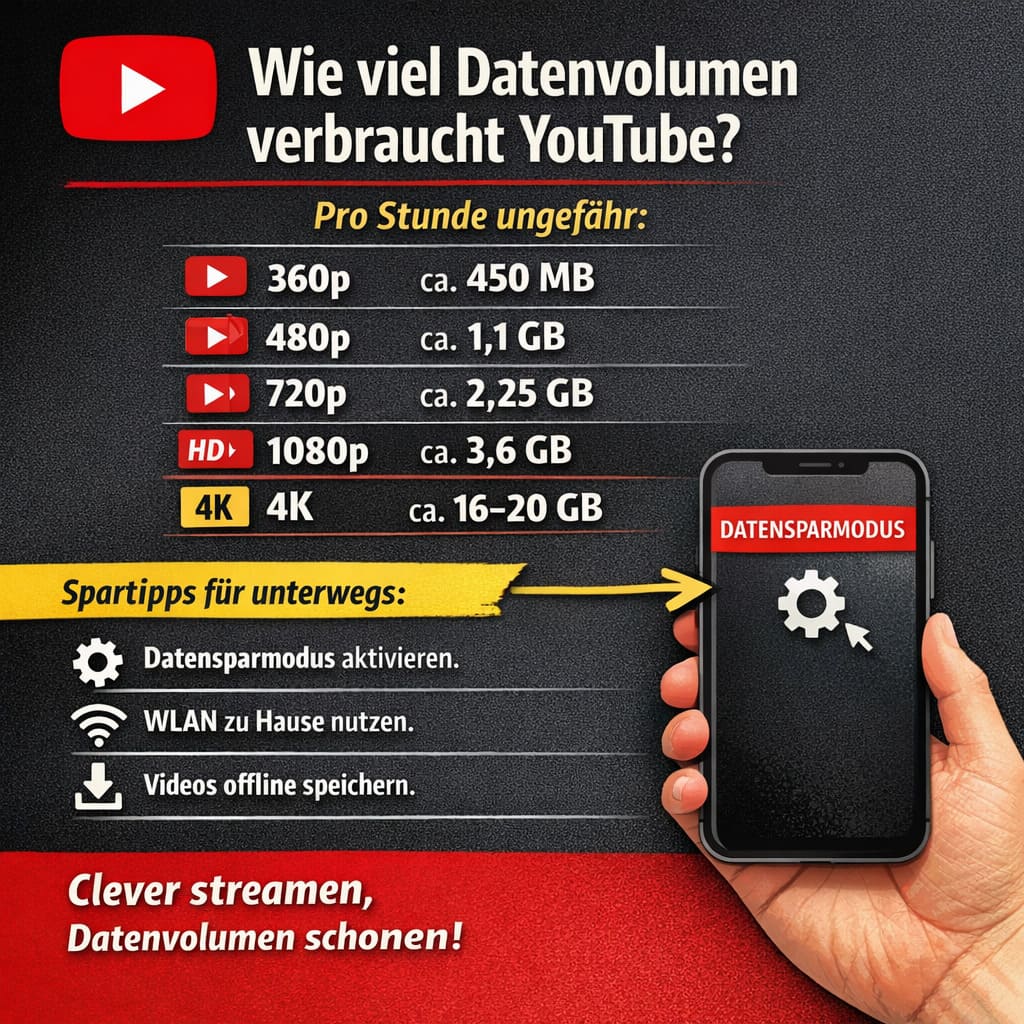
Standard values: Data consumption per hour according to resolution
Note: „Standard Frame Rate“ (24/25/30 fps). At 50/60 fps the bit rates and thus the consumption are higher (see HFR column in the source).
- 144p - very low
PracticeFrequently < 0.3 Mbit/s ⇒ < 135 MB/hour
(YouTube does not specify a 144p upload value; extremely economical in practice). - 240p-360p - Basic quality
Recommendation 360p ~ 1 Mbit/s ⇒ ~ 450 MB/hour. - 480p (SD) - solid readability
Recommendation 2.5 Mbit/s ⇒ ~ 1.1 GB/hour. - 720p (HD) - sharp on the cell phone
Recommendation 5 Mbit/s ⇒ ~ 2.25 GB/hour. - 1080p (Full HD) - Very sharp
Recommendation 8 Mbit/s ⇒ ~ 3.6 GB/hour. - 1440p (2K) - Very high quality
Recommendation 16 Mbit/s ⇒ ~ 7.2 GB/hour. - 2160p (4K) - maximum
Recommendation 35-45 Mbit/s ⇒ ~ 15.8-20.3 GB/hour.
Why „recommendation“? YouTube gives these bit rates for Upload streaming is often more efficient (modern codecs, variable bit rate). The table is therefore suitable as a upper Guide value. In practice, your values may be ~20-40 % lower - depending on the video, codec (AV1/VP9/H.264), device and network quality.
What do YouTube shorts, music & livestreams consume?
YouTube Shorts
- Mostly 720p to 1080p, very short clips.
- Calculate per minute rather with 30-100 MB (rough range), depending on quality.
- Many shorts in a row add up: 20 minutes of „swiping“ can quickly add up. 600 MB-2 GB mean.
YouTube Music (pure audio vs. video)
- Audio-Only (e.g. screen off or music app): typically less as a video - as a rule of thumb 40-150 MB/hour, depending on the quality.
- Music video in 480p/720p follows the values above (≥ 1.1 GB/hour or ≥ 2.25 GB/hour).
Livestreams
- Need because of permanent transfer and often higher frame rate sometimes more data than on-demand clips in the same resolution. Plan with 1080p/60 rather direction 4-5 GB/hour (in real terms it fluctuates greatly).
How to set YouTube to „economical“ (Android & iOS)
You can Video quality and Data consumption directly in the app:
- During the videoGear wheel/„Quality“ → Car, Higher image quality or Data saving mode choose.
- GlobalProfile picture → Settings → Prefer video quality (mobile/WLAN separate).
YouTube describes these menus and names in the help section - ideal for controlling consumption without having to change them manually each time.
Tip: Activate „Data saving mode“ for mobile data and „Car“ or „Higher image quality“ in the WLAN. This way you protect your data package on the move and get the best quality at home.
Calculation examples that you can use immediately
Example 1: Commuting, 30 minutes a day, 720p
- 720p guideline: ~ 2.25 GB/hour ⇒ ~ 1.125 GB/30 min.
- 5 commuting days: ~ 5.6 GB/week.
Savings variant: Set up mobile 480p (data saving mode): ~ 1.1 GB/hour ⇒ ~ 550 MB/30 min → ~ 2.75 GB/week instead of 5.6 GB.
Example 2: 1-hour livestream in 1080p
- 1080p guideline: ~ 3.6 GB/hour (at 30 fps).
- Livestreams with 60 fps can be higher - plane 4-5 GB in.
Example 3: Weekend shorts only (20 minutes)
- Calculate roughly 600 MB-2 GB, depending on resolution/codec.
Quick tips for saving money on the go
- Limit mobile quality: In the settings „Data saving mode“ for mobile data.
- Use & preload WLANWatch at home via WLAN or save videos/playlists offline (YouTube Premium).
- No autoplay in high quality: If the network is weak, set the quality manually to 360p/480p fix.
- Audio-only for music: Screen off/YouTube Music saves a lot of data compared to music videos.
Practical story: „My 10 GB package was empty after 1 week - why?“
Max streamed on his way to work 1080p (30 minutes there, 30 minutes back). These are ~ 1.8 GB/day, so ~ 9 GB in 5 days - without weekend YouTube. He then set up mobile 480p and stayed with < 5 GB/week - without lacking much quality on the small cell phone display. That is precisely the lever: Resolution matching the context.
FAQ - frequently asked questions about YouTube data volume
Does YouTube Premium use more data?
No. Premium mainly changes the Advertising (no ads) and enables Downloads/Background-Play. The Stream itself consumes a similar amount - the decisive factor is the Selected quality. (To control the quality, see YouTube Help).
Why do my values fluctuate so much?
codecs (AV1/VP9/H.264), variable bit rate, picture content (calm vs. action-packed), frame rate (30 vs. 60 fps) and network conditions. The figures mentioned here are Realistic guide values on the basis of the YouTube bitrate tables; they serve as conservative planning.
Does „data saving mode“ really save much?
Yes - the app prioritizes lower image quality for mobile data. In practice, this can Data halving or better (e.g. 360p/480p rather than 720p). For settings, see the help article.
How much does a YouTube video consume in one hour?
See guide values above: 360p ~ 450 MB, 480p ~ 1.1 GB, 720p ~ 2,25 GB, 1080p ~ 3.6 GB, 4K ~ 16-20 GB/hour (Rule of thumb via recommended bit rates × 450 MB).
Summary
how much data volume does youtube use? Roughly per hour: 360p ~ 450 MB, 480p ~ 1.1 GB, 720p ~ 2,25 GB, 1080p ~ 3.6 GB, 4K ~ 16-20 GB. Set in the app under Quality the Data saving mode for mobile use - so your data package stays relaxed.
Bigfollow
Bigfollow has been the leading Swiss provider for social media growth, follower packages, likes and engagement boosts since 2022.