Contents(6)
Why block someone on TikTok?
Are you annoyed by someone on TikTok and wondering: "How do you block on TikTok?" Don't worry - you're not alone. TikTok is a huge social media platform with millions of users, and unfortunately, not all interactions there are friendly. Luckily, the TikTok app offers the option to block unpleasant people with a Block permanently from your digital world. According to the official TikTok help center, blocking means that the blocked person your posts and can no longer interact with you via direct message, comment, follow or like.
So blocking helps you to protect your privacy and maintain a safe, positive experience on TikTok. There are many reasons why you might block someone on TikTok. Here are some typical situations in which the block function is useful:
- Harassment or bullying: If someone insults you in comments, constantly writes negative comments or trollsyou can block this user to have peace of mind.
- Spam or advertising: Some accounts spread unwanted advertising or send you masses of messages. You can keep your feed clean by blocking such accounts.
- Protect your privacy: Maybe someone is following you who you don't want to share your content with - for example, a stranger who keeps looking at your profile. By blocking this person, you ensure that they can no longer see your videos.
All these examples show: The blocking function is a useful tool with which you can you you retain control over your TikTok experience. And don't worry: if you block someone, the person gets No notification about it. Blocking is discreet, so you can get rid of unpleasant contacts without provoking a conflict.
How to block people on TikTok - step-by-step guide
Wondering how exactly you can block people on TikTok? Fortunately this is block someone on TikTok much easier than you might think. Simply follow these instructions and you will have blocked the annoying user in just a few seconds:
- Open the TikTok app and call up your profile: Open the TikTok app on your smartphone (and log in if you are not already logged in). Then go to the profile of the person you want to block. You can find the profile by searching or by selecting the username elsewhere.
- Tap the menu button: On the user's profile page, you will find an icon with an arrow at the top right (the Share-icon) - tap on it. In the TikTok desktop version, there is an icon with three dots instead.
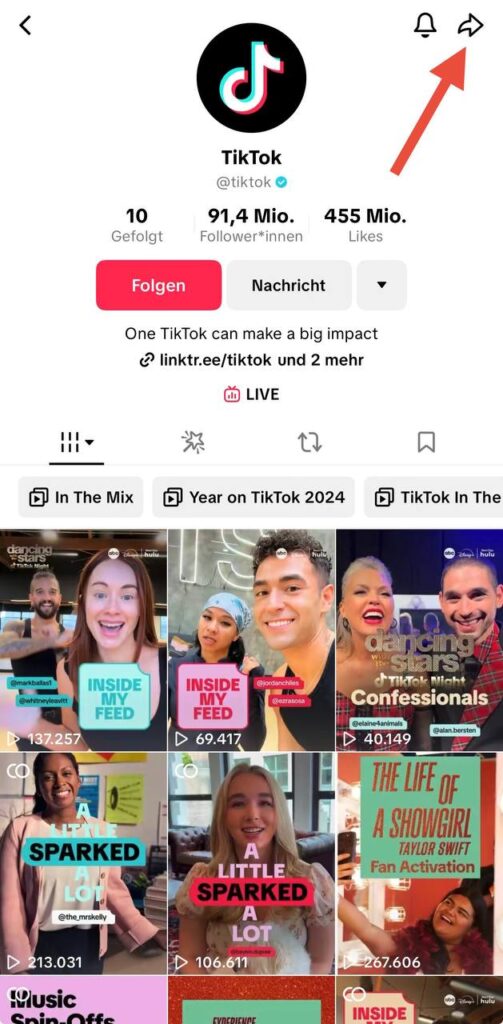
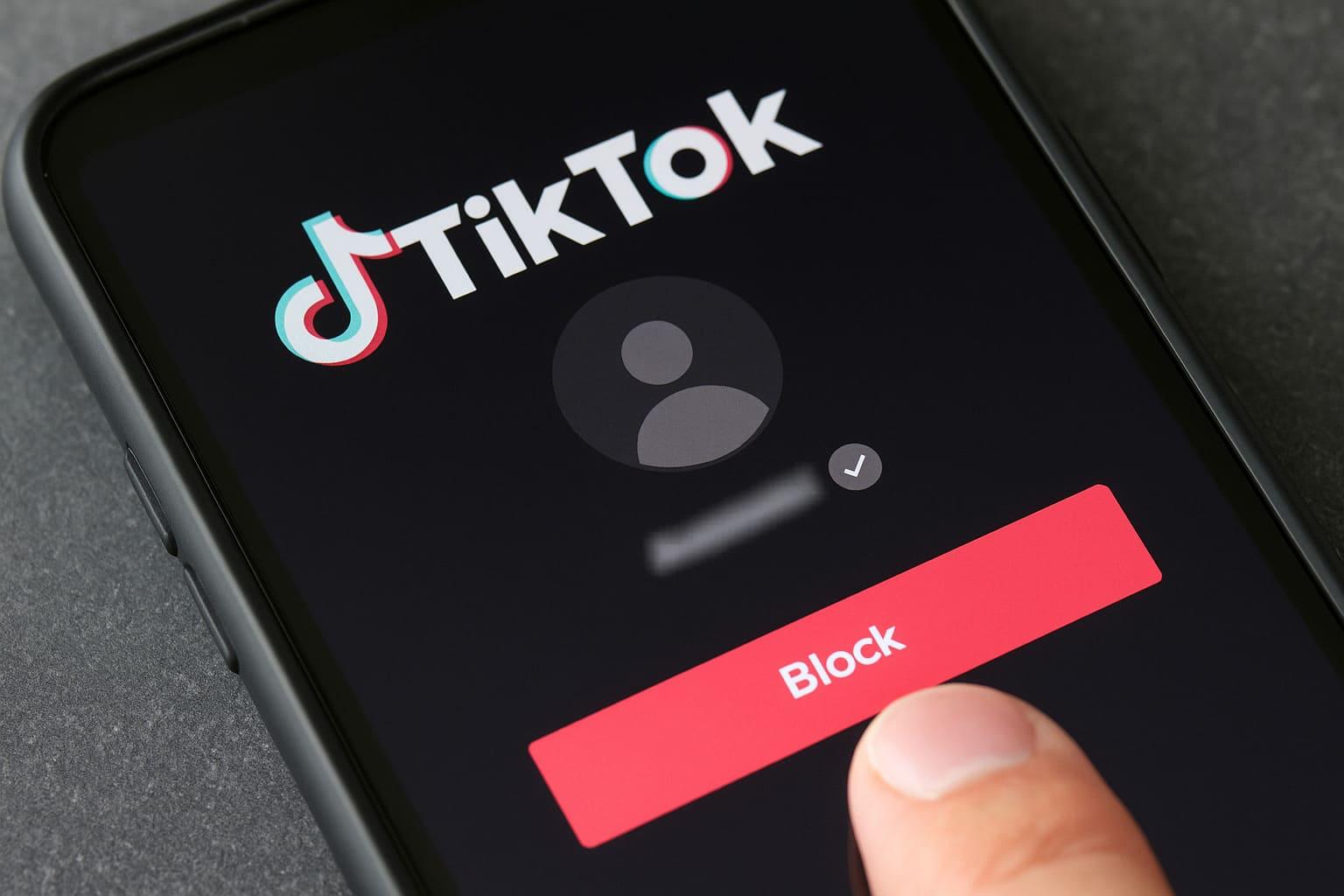
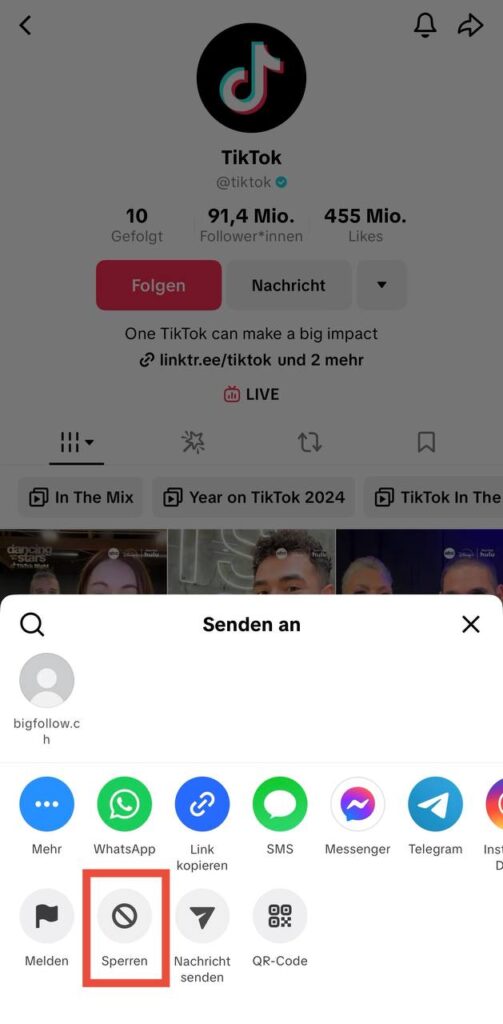
- Select the «Lock» option: A menu with various options opens. Choose here "Lock" from the list.
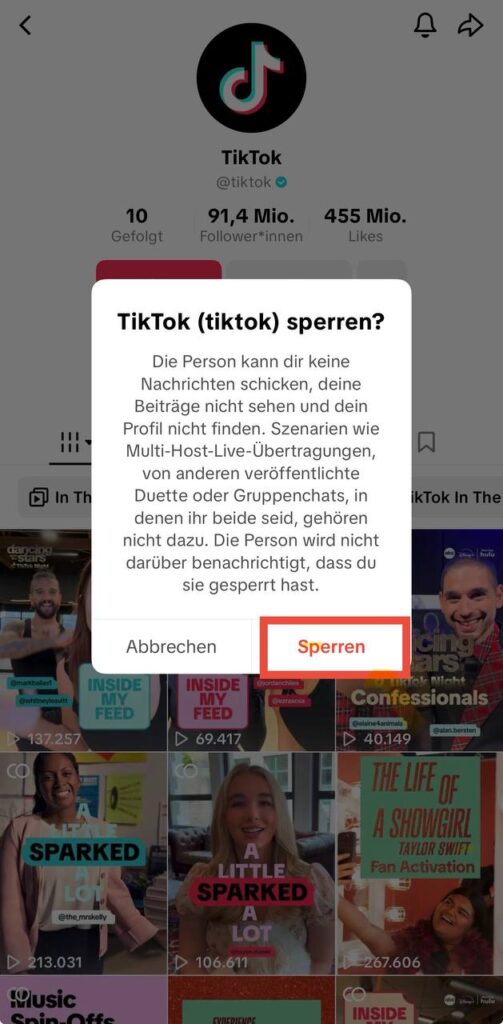
- Confirm blocking: TikTok will now ask if you really want to block this person. Confirm your selection by clicking again on Locks type.
- Done - user is blocked: As soon as you have confirmed the block, TikTok will briefly inform you that the user has been blocked. From this moment on, this person can view your content no longer seeno longer send you messages and no longer comment or follow you.
Video instructions
That's it! You have just learned how to block someone on TikTok and the unwanted contact is banned from your TikTok interactions. The blocked person is not informed about this - she only notices when she tries in vain to access your profile or write to you, for example. In turn, you will no longer see anything from this account.
Tip: Would you like to block several people at once on TikTok? That is also possible. TikTok offers a Mass blocking-function, which allows you to block up to 100 users in one go. To do this, open one of your video posts and go to the comments. Press and hold an annoying comment and then select "Manage multiple comments". Mark up to 100 comments (from different users), then tap on "More" and then to "Block accounts". Confirm the selection - and you have blocked all selected accounts at once. More information here: support.tiktok.com.
Unblocking someone on TikTok (unblocking)
Sometimes you block someone in the heat of the moment or by mistake and want to undo it later. No problem - you can remove any block on TikTok at any time. A user to unblock (TikTok calls this Unlock or Unblocking) is just as easy as the blocking itself. This is how you remove the block:
- Open profile & settings: Open TikTok and go to your own profile at the bottom right. Then tap the menu button (☰) at the top and select "Settings and data protection".
- To the "Blocked accounts" area: Scroll down a little and tap on "Privacy". There you will find the option "Blocked accounts" - tap on them. This will display a list of all TikTok users you have blocked (your Block list).
- Unlock user: In the list of blocked accounts, find the person you want to unblock. Tap the button next to the user name "Unlock" (sometimes it says "No more blocking"). Confirm the process if necessary. The user will be unblocked immediately.
Alternatively, if you can still find the blocked person's profile, you can also go directly to their profile page. There, tap again on the Arrow menu top right and select "Unlock". However, this only works if the profile can be found by you. The safest way is therefore the one described above via the Blocked accounts-list in the settings.
After unblocking, the person in question can see your profile and videos again and interact with you, just like before. Please note: When you unblock someone, the person receives also no notification about it. However, if desired, the user would have to follow you again, as blocking them previously removed them from your follower list.
What happens if you have been blocked on TikTok?
Many people ask themselves the question: How do you actually recognize that you have been blocked on TikTok? TikTok doesn't tell you directly when someone has blocked you - but there are some clear signs. If a user blocks you on TikTok, you will no longer be able to access their profile and videos and you will not receive any notifications. In other words, the profile appears to be virtually invisible to you. Here are a few typical indications that you may have been blocked:
- Profile cannot be found: The simplest method is to search. If you enter the person's username and can't find them using the TikTok search, it could be because they have blocked you. A profile that has blocked you will not appear in your search.
- No content visible: If you used to have videos of this person in your For you or Follow me-feed, but they have suddenly disappeared, this is another sign. Blocked users no longer see the content of the blocker - and vice versa.
- Disappeared chat messages: Take a look at your direct messages (DMs). Have you chatted before and suddenly the chat history has disappeared or the user's name is no longer displayed? This may indicate that the person has blocked you (or deleted their account).
- Tagging not possible: Try tagging the person in a comment or video (@username). If their name is not auto-completed or appears as "not found", this could be because they have blocked you.
- Check with logout trick: If you are still unsure, there is a little trick: Log out of your TikTok account or use a web browser in incognito mode and search for the profile in question again. If the profile without login suddenly appears while it is not visible in your logged-in account, you have most likely been blocked.
These tips will help you to assess the situation, what it looks like if you have been blocked on TikTok. TikTok does not display an official "You have been blocked" message. So you'll have to do a bit of detective work yourself to find out for sure. Important: If you have actually been blocked, you cannot bypass this - unless the other user decides to unblock you again. In the meantime, you have the option of viewing the profile with a second account or as a TikTok guest, provided it is public (the block only applies to your original account).
FAQ: Frequently asked questions about blocking on TikTok
Does the other person realize that I have blocked him on TikTok?
No - the other user gets No direct notification about the fact that you have blocked him. TikTok keeps blocks private. The user will only notice when they can no longer find your profile or your content. For you, this means that you can block someone without having to worry that it will immediately trigger an argument. The block remains unnoticed until the person actively searches for you or wants to send you a message and realizes that they cannot.
How do I unblock (unblock) someone on TikTok?
You can remove a block at any time. To do this in the TikTok app, go to Profile > Menu (☰) > Settings and data protection > Privacy > Blocked accounts. There you will see all blocked users. Tap on the desired person "Unlock". Alternatively, if the profile is still visible, you can select the option to unblock directly on the profile page (via the same menu where "Block" was previously located). The user is then immediately unblocked and can see your profile again, follow you or send you messages.
Can I block several TikTok users at the same time?
Yes, you can do that. TikTok has a built-in function to block multiple users at once. As mentioned in the tip above, you can use the comments under one of your videos to do this. Select several annoying comments (up to 100) and block the corresponding accounts in one go. This mass blocking is useful if you are dealing with a lot of spam comments or bots - it saves you the trouble of going to each profile individually and blocking them.
What happens to the likes and comments of the blocked person?
Already existing Likes and comments of the blocked person on your videos will initially remain. However, after blocking, the person can no longer access your content. She will therefore no longer see her own previous comments under your videos. If old comments bother you, you will have to delete them manually. Of course, the blocked person can no longer leave new comments or likes as they no longer have access to your profile
Can a blocked person still see my profile somehow?
Basically no - within TikTok, a blocked user can no longer access your profile. Even if your account is public, it remains invisible to the blocked account. Theoretically, however, the person could look at your profile without logging in or with another TikTok account, as the block only applies to their original account. So if you want complete security that certain people cannot view your content not at all you could view your account on private place. In most cases, however, blocking is sufficient to keep unwanted spectators away.
Conclusion: Blocking on TikTok - simple solution for annoying users
Blocking someone on TikTok is the perfect way to protect your account from annoying contacts. As we have seen, it's very easy: go to the person's profile, tap on the Share menu and select Block - They will not be able to watch your videos or send you messages. This function is discreet and effective in maintaining a safe and pleasant environment in the app.
You retain full control over your followers, comments and content. And best of all, if you change your mind, you can unblock them at any time. With the block function of the TikTok app, you ensure that TikTok remains a place for you that Fun and on which you feel good.
Bigfollow
Social media team
BigFollow is the social media shop of PortalWeb GmbH in Altdorf, Switzerland. Since 2022 we have delivered followers, likes and views with a focus on quality so that profiles really grow. Our social media team writes the guides and tutorials on the blog.
Learn more about Bigfollow