
How to Repost a Story on Instagram?
How to Repost a Story on Instagram?

Contents8
- 1. why repost a story at all?
- 2. how to repost a story in which you have been tagged
- 3. how to post a story on Instagram without tagging?
- 4. interim conclusion: Better with marking than without
- 5. repost Instagram reels and feed posts
- 6. example from everyday life
- 7 FAQ: Frequently asked questions about the story repost
- 8 Conclusion / Summary
How to post a story on Instagram? You've probably asked yourself this question when you've seen a great photo, a funny video or an exciting post in an Instagram Story and wanted to share it with your followers. You often come up against certain limits: You are not tagged, the person has a private Instagram profile or you don't know how to officially "forward" stories.
In this article, you will learn step by step how to repost an Instagram Story - with and without a tag. We'll also give you tips on how to share content such as reels or Instagram images and what options there are if the whole without marking should take place. Let's see together how you can get ahead in the app as quickly and easily as possible!
1. why repost a story at all?
Before we go into the specific question, how to repost a story on instagramlet's briefly ask ourselves why we need this function. In the social media world - whether Instagram, TikTok or Facebook - it's all about networking and sharing content. A story repost offers you the following advantages:
- Shared content: You can share posts from friends, customers or followers to show them to your network.
- Additional range: When you repost something, the original author also benefits from more visibility.
- Collaborations: Especially for companies or creators, a joint repost can strengthen collaboration.
- Time savingInstead of creating a new story yourself, you can integrate existing content and save time.
In the following sections, we explain in detail which ways there are to integrate an Instagram story into your own story and which special features you should consider.
2. how to repost a story in which you have been tagged
The easiest way to repost an Instagram Story is if you have been tagged in a Story. The app then automatically allows you to share this post in your own stories.
Step-by-step instructions
- Check notificationAs soon as someone tags you in their story, you will receive a notification in your Instagram inbox (Direct Messages).
- Open storyClick on the message. You will land in the story in which your profile is linked.
- "Add to your story" optionInstagram usually shows you the option to add this content to your own story.
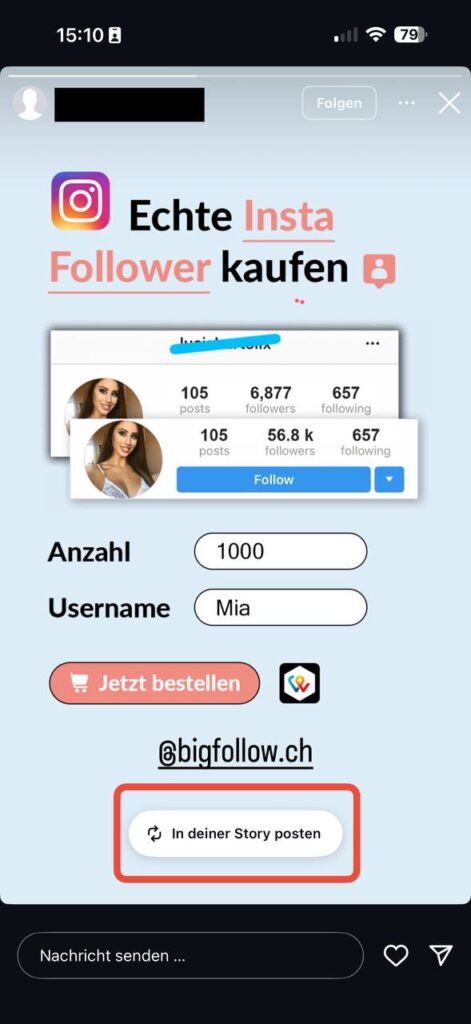
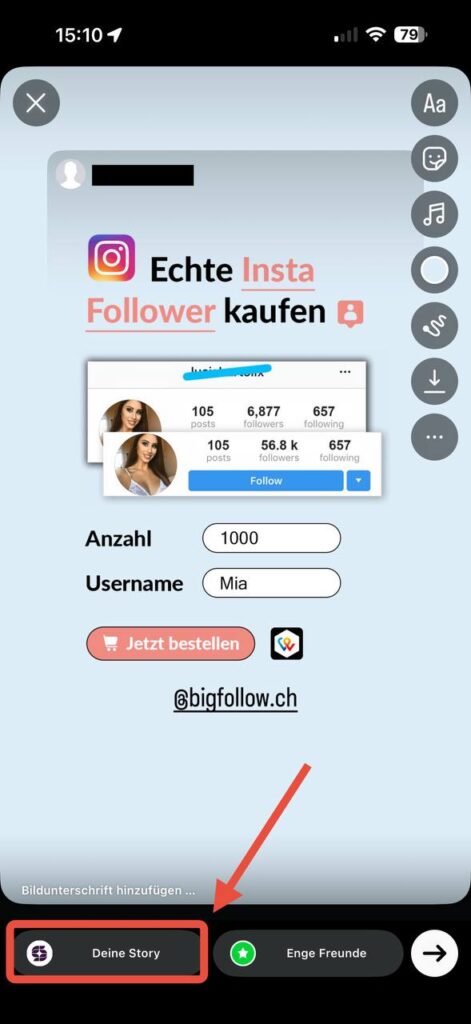
- Customize and postYou can now add stickers, text or GIFs and customize the format. Click on "Share" or "Story" to publish the post in your story.
This variant is Very simple and officially provided by Instagram. However, you must make sure that the respective profile is public or that you are following each other. With private profiles, the repost only works if certain settings are permitted.
3. how to post a story on Instagram without tagging?
This is not possible in the app. Instagram only allows you to repost other people's stories if you have been tagged in them. Without a tag, there is no native button. What does work, however: You can share feed posts (photos, carousels, reels) in your story - as long as the creator allows it and the account is public.
3.1 The integrated share function
- Step 1: Look at the post you want to share.
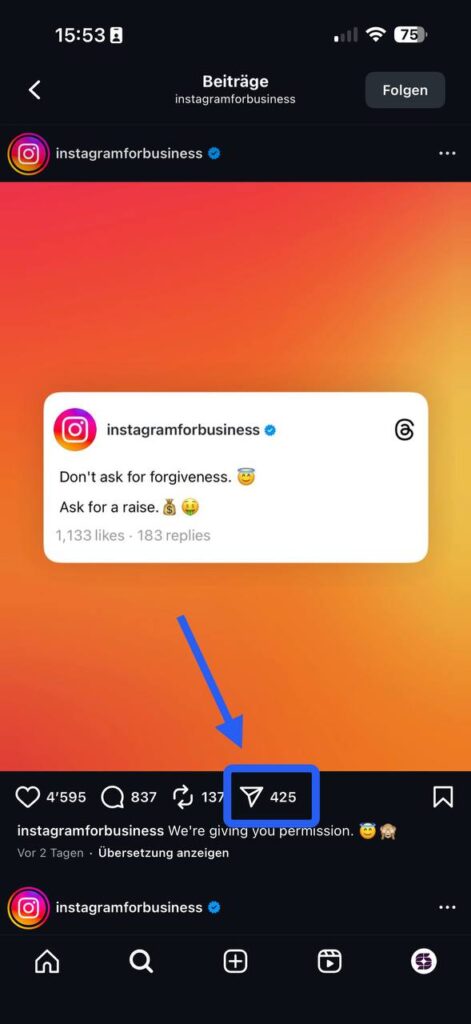
- Step 2Tap on the "Share" symbol (the small paper airplane symbol on many posts) and select "Post to your story".
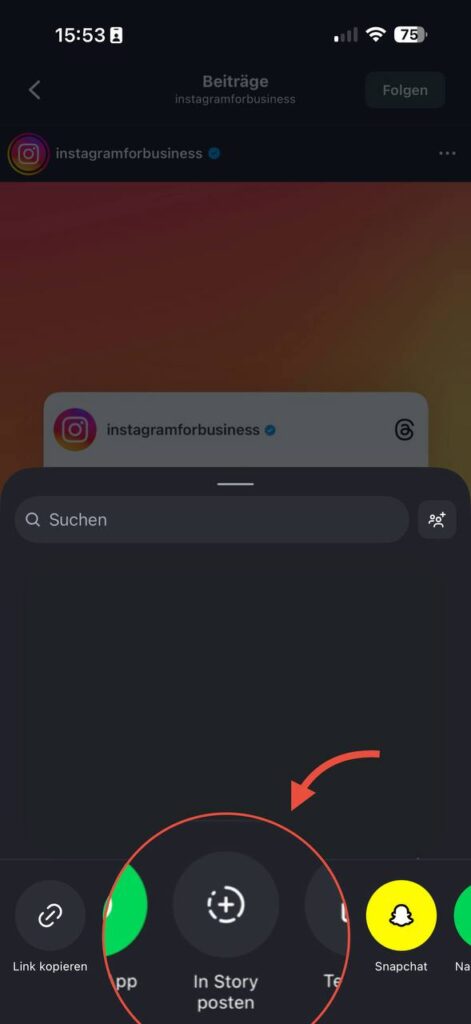
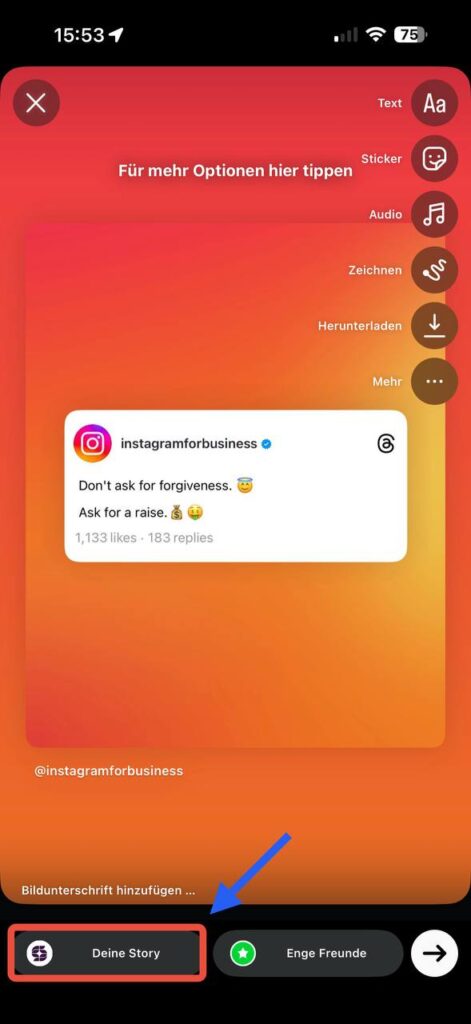
- Step 3Customize the shared content. Add stickers, text or music.
- Step 4: Publish the story.
Note: There is no official repost function for stories from other accounts without a tag. Ask the person to tag you, or create your own story and link the account manually. Pay attention to copyrights and get permission if in doubt.
3.2 Screenshot as a workaround
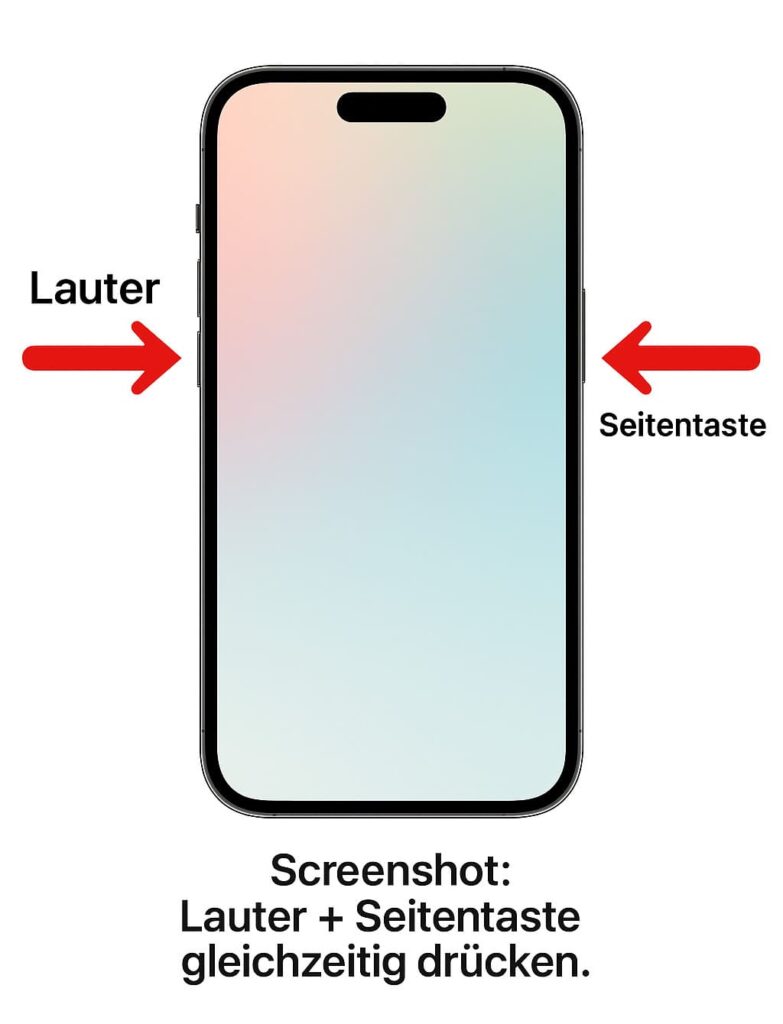
You could use a Screenshot of the story and then upload it to your own story. Before you do this, however, you should consider the following:
- CopyrightsYou are using content that does not belong to you. Better ask permission before sharing screenshots.
- Loss of qualityA screenshot usually has a lower resolution than the original.
- Manual process: You must first save the screenshot, crop it and then upload it to the story again.
3.3 External apps and tools
There are various third-party apps that advertise the ability to download and repost stories. However, they are often not officially licensed by Instagram. This means that
- Possible Violations against Instagram's terms of use
- Security riskas external apps may require access to your account
- Possible loss personal data
Unless it is absolutely necessary, we advise against using tools that request your access data. Instead, it is better to ask the author directly and ask for a tag, which makes things much easier and safer.
4. interim conclusion: Better with marking than without
Here is a brief interim report: How to post a story on Instagramif you have not been tagged? There is currently no official in-app function for simply sharing other people's stories. The easiest solution is to ask the creator to tag you. Then you can easily publish the content to your own Instagram profile.
Alternatively, you can use a screenshot or screen recording, but this is associated with copyright and quality issues. If in doubt, communication can help: creators or friends are often happy to add you so that you can officially share their content.
5. repost Instagram reels and feed posts
With Reels and normal feed posts like photos or videos is often easier than with stories. That's why it makes sense to go into this briefly.
5.1 Share reels
- Call up reelOpen the reel you want to share.
- Paper airplane symbolClick on the symbol below the reel.
- Select optionSelect "Post to your story" or send the reel directly to a friend via message.
- AdjustmentsAdd stickers, text or GIFs and post it in your story.
5.2 Feed post in your story
Even with classic Instagram images or videos from the feed you proceed in a similar way:
- Open article
- Share symbol (click on paper airplane)
- "Add to your story" option select
- Publish story
This will display a kind of preview of the post in your story, which your followers can click on directly to view the original. This is ideal if you want to promote your own new posts, for example, or want to highlight a post from another page that perhaps fits the topic.
6. example from everyday life
An example from everyday life: Lisa has opened a small café and posts beautiful photos and stories about her range every day. One day, a well-known food blogger mentions her café in his story, but without tagging Lisa. She saw the story and wanted to share it to make her followers aware of it.
As she wasn't tagged, she first had to contact the food blogger and kindly ask if he could tag her afterwards or send her the story for her sake. In the end, Lisa was sent the clip directly and was able to integrate it into her own Instagram story. Both sides benefited: the blogger had more views, Lisa was happy about the new reach - a classic win-win situation.
This small example shows that communication can work wonders in social media. A short message is often enough to get the desired content and share it legally and conveniently.
7 FAQ: Frequently asked questions about the story repost
Below we answer typical questions that arise around the topic of "how to post a story on instagram". So you'll be prepared for all eventualities.
Can you see when I take a screenshot of a story?
For regular stories, Instagram gives none notification when you take a screenshot. The situation may be different for certain direct messages (self-deleting photos/videos). As a rule, however, the story creator does not find out about your screenshot directly.
Can I share stories even if the profile is private?
If the profile is private and you are not a follower, you will not be able to see or share the content. Even if you are a follower, Instagram only allows limited sharing. It's best to ask the person directly whether they want to authorize you to share or whether they want to approve the post for a public profile.
Is there an app that allows me to share stories without tagging?
Some third-party apps promise this function, but they are often not secure. You run the risk of violating the Instagram guidelines or risking your log-in data. We therefore recommend communicating directly with the owner of the story to share content legally and stress-free.
How can I highlight a post in my story?
Open the post, tap on the share icon and select "Post to your story". This places the feed post as an interactive preview in your story. Your followers can visit and like the original post by clicking on it.
Can I share several posts in my story at the same time?
Instagram supports the sharing of multiple postsby adding them to your story one after the other. For example, you can first add a reel to your story and then add a second post or another photo by tapping the share icon again. Make sure to arrange the order so that the story flow remains consistent.
8 Conclusion / Summary
How do you post a story on Instagram? The optimal solution is direct tagging: If you are linked by name in an Instagram Story, you can share easily and officially using the "Add to your Story" button. Without tagging, the process is more complicated. Unfortunately, Instagram does not officially offer a direct function for sharing someone else's story with just a few clicks. The only way out is to take a screenshot (or screen recording) and upload it to your own story. However, you should always obtain the consent of the copyright holder to avoid legal and moral uncertainties.
If you are a bit creative or communicate well, you can get a declaration of consent even without being tagged and ultimately repost the story just as effectively. This way, you bring other people's content to your Instagram profile, support their reach and at the same time create exciting content in your own stories.
Bigfollow
Bigfollow has been the leading Swiss provider for social media growth, follower packages, likes and engagement boosts since 2022.