Contents(9)
- 1Is social media worth it for clubs?
- 2Which platform fits your club?
- 3Creating an Instagram account for your club: Here's how
- 4What should a club post? Ideas for every week
- 5Sports photos and videos with your phone
- 6Data Protection and Image Rights: What Can an Association Post?
- 7How Much Time Does Social Media Take in an Association?
- 8Conclusion: Start Small, Keep Going
- 9FAQ on Social Media for Associations
In short: Social media is worth it for every club looking to recruit new members, volunteers, or sponsors. For youth, Instagram is the go-to platform: 83% of young people in Switzerland who use social networks are there several times a week. Start with a business account, two to three posts per week, good smartphone photos, and clear rules for image rights.
More reach for your start: buy Instagram followers from BigFollow, without a password.
Social media for clubs is today the easiest way to show what's happening at your club: training sessions, matches, events, and the people behind it all. Here you'll learn which platform suits your club, how to manage the account together, what you can post, and what applies in Switzerland when it comes to photos of members and children.
Is social media worth it for clubs?
Yes, if you have a clear goal. A club account isn't an end in itself, but it helps with tasks every club faces:
- Win new members: Anyone looking for a trial session first checks Instagram to see what's going on at your club.
- Find volunteers: For the friendly tournament or the club trip, a story reaches more people than a notice on the bulletin board.
- Thank sponsors: A post with logo and thanks is often worth more to donors than a banner at the field's edge.
- Strengthen community: Members, parents, and alumni see what's happening and share it further.
More important than many posts is a regular rhythm. An account that's silent for months looks like a club where nothing's happening.
Which platform fits your club?
For most clubs, Instagram is the right main platform, supplemented by WhatsApp for internal communication. This is shown by the JAMES Study 2024 from ZHAW, which surveyed 1'183 young people from across Switzerland.
94% of them use at least one social network. Of those, 83% are on Instagram several times a week, 69% on TikTok, and only 4% on Facebook.
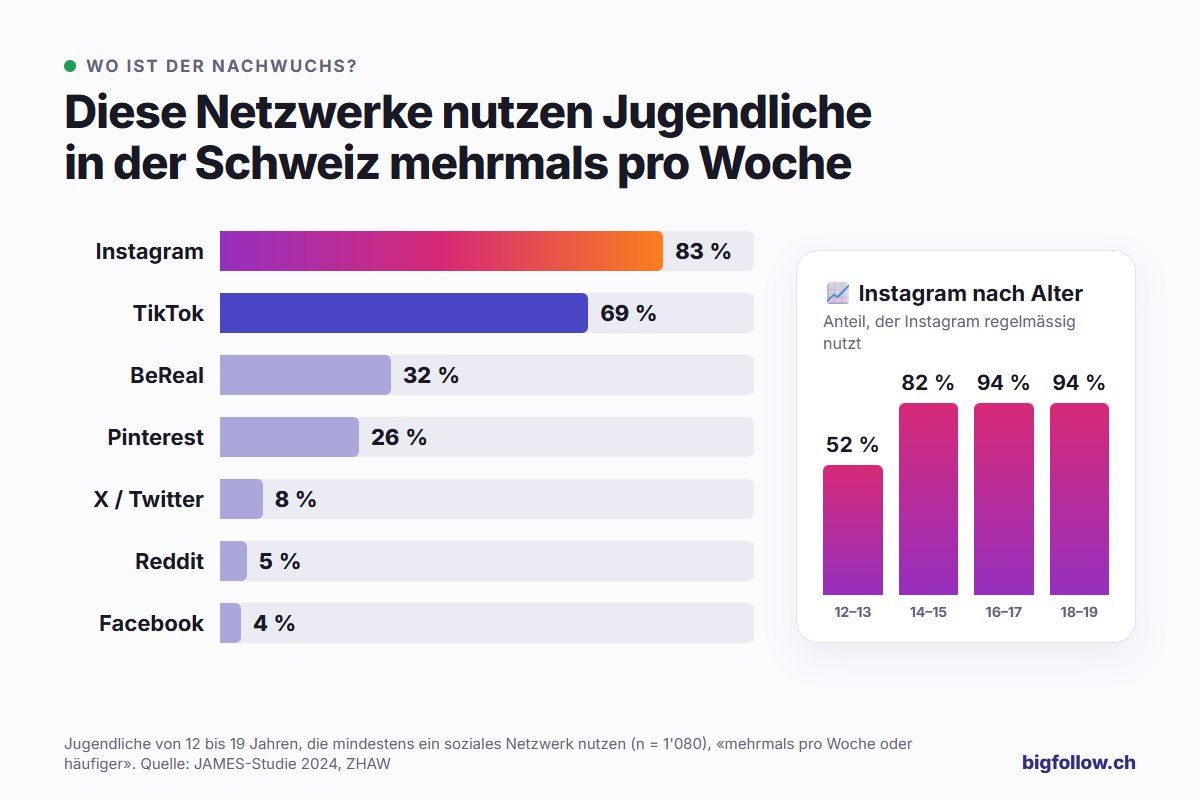
Interesting for clubs with a youth section: Among 12 to 13-year-olds, only 52% regularly use Instagram, while among 16 to 19-year-olds it's 94%. For internal information to teams, WhatsApp is suitable: 96% of young people who use messengers are there several times a week.
| Platform | Good for | Young people, several times a week | Effort (our estimate) |
|---|---|---|---|
| Photos, Reels and Stories for youth, members, and sponsors | 83% | medium | |
| TikTok | short videos that are quick to shoot | 69% | high |
| Events and groups | 4% | low | |
| internal information for teams and parents | 96% of messenger users | low |
Our tip: Rather do one platform well than three halfway. Ask your members briefly where they spend their time, and start there.
Creating an Instagram account for your club: Here's how
You create a club account like a regular Instagram account and then convert it to a professional account. Instagram recommends a business account for organizations. Creator accounts are intended for creators, artists, and public figures.
- Create a new account with a club email address, not the private email address of the president.
- Tap More in your profile and under «Professional dashboard» tap Account type and tools.
- Select Switch to professional account, choose an appropriate category (e.g. sports club) and then Business.
- Add contact details, profile picture and bio.
Note: A professional account is always public. In return, you get analytics, a contact button and can schedule posts. For more information on what a professional account offers, see What is a professional account on Instagram?
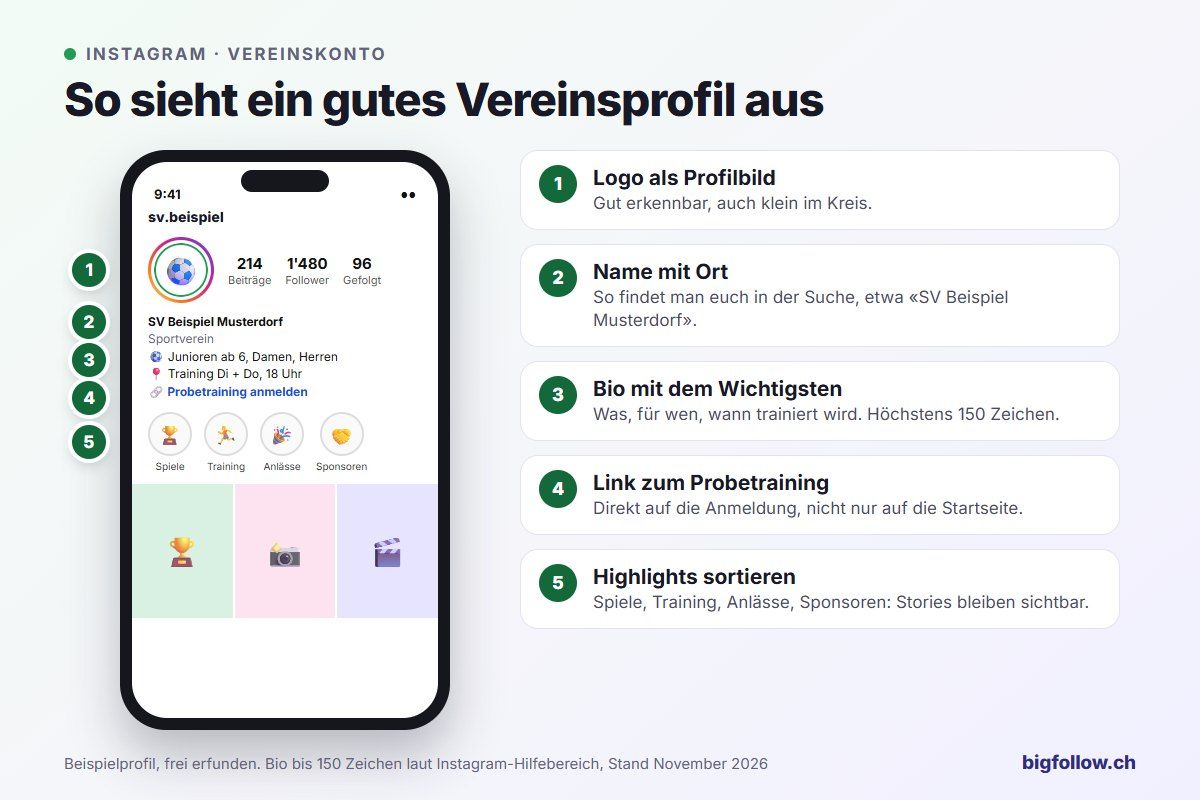
Your bio can be a maximum of 150 characters. Write what you do, where you train and how to get involved. It's best to link directly to sign up for trial training. For instructions on how to do this, see Where is the bio on Instagram?
How do multiple people manage the club account?
Don't share the password in the board chat group. If someone leaves office, they still know it, and you never know who posted what. Instagram and Meta offer two better options:
- Shared access in the app: Under Menu → Shared access → Invite people, others can post and comment without knowing your password. According to the Instagram Help Center, this feature is only available for eligible accounts and not for teens. With a Meta One subscription, you can invite 4 to 30 people depending on your plan.
- Meta Business Suite: In the business portfolio under Settings → People, you invite board members and assign them to the Instagram account. Meta recommends giving each person only the access they need.
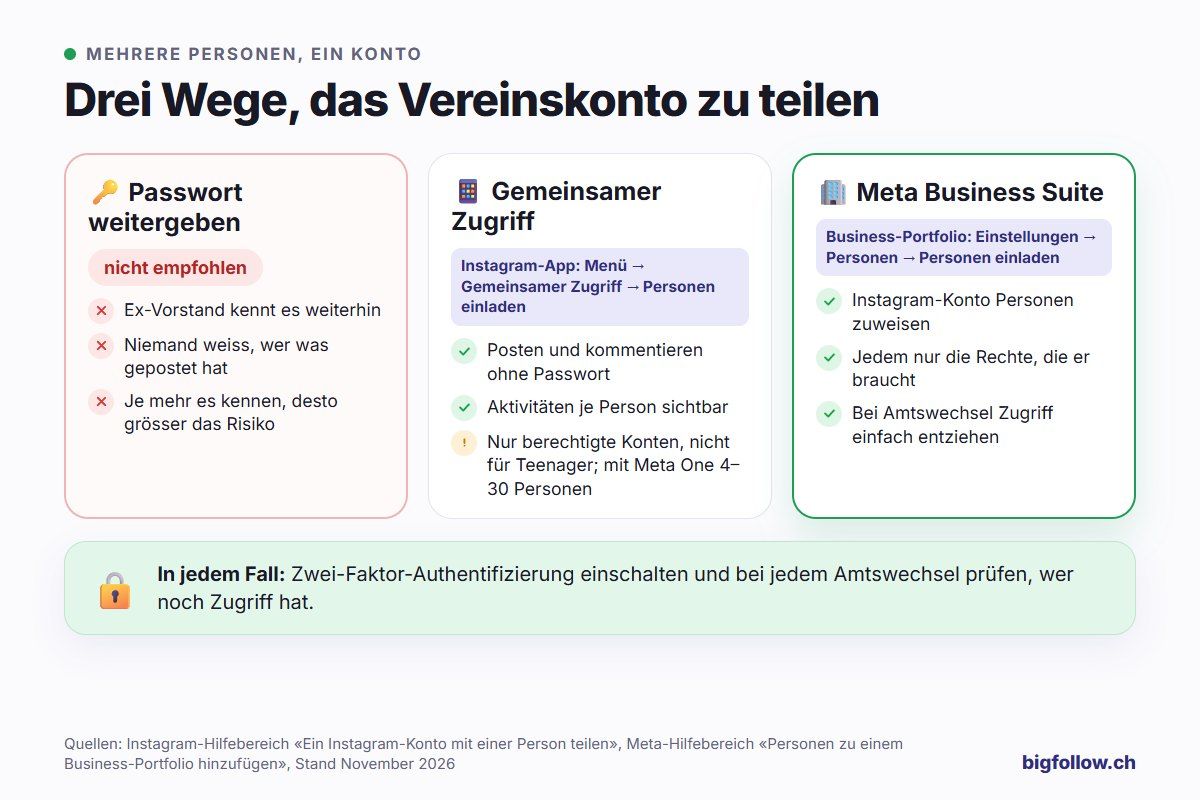
In any case, enable two-factor authentication and check who still has access whenever there is a change in office.
What should a club post? Ideas for every week
Post what only your club can show: real moments from training, games and club life. These formats have proven themselves:
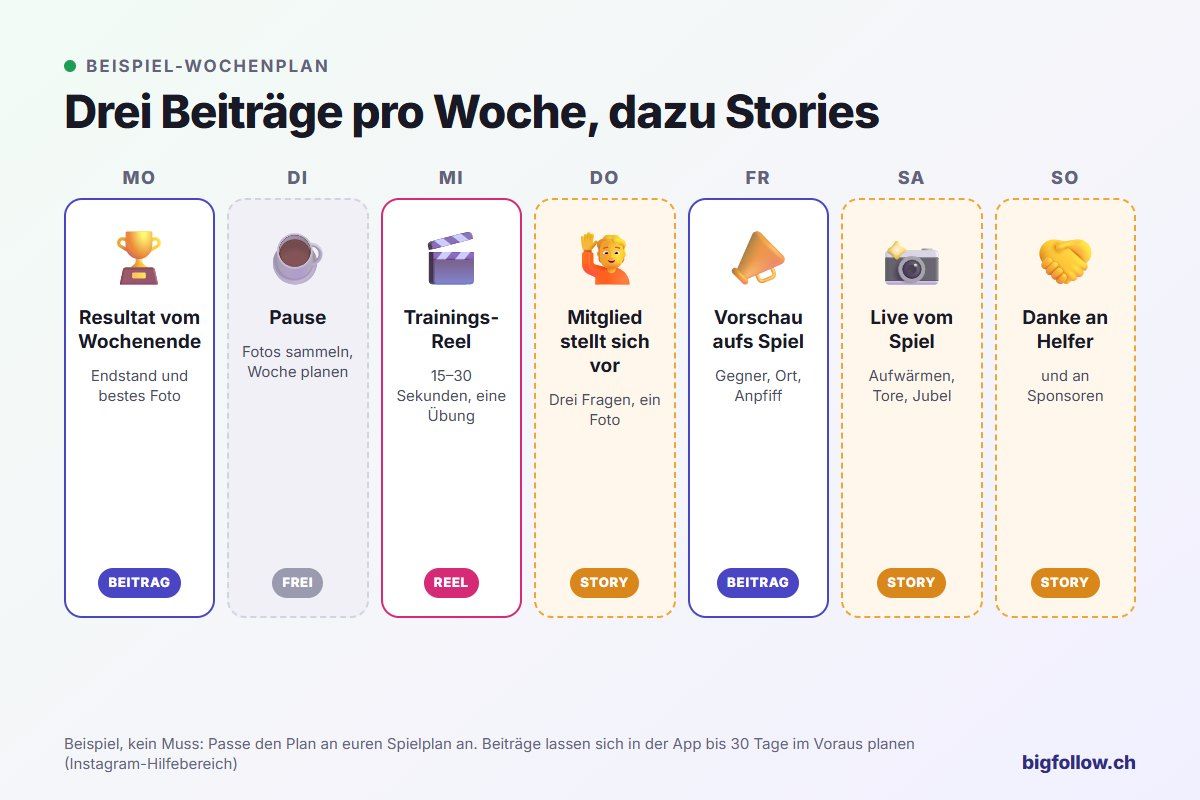
- Match result on game day: Final score, best photo and a sentence about the game.
- Preview: Opponent, location, kick-off time. A Story with a countdown as a reminder.
- Training Reel: 15 to 30 seconds from training, ideally with an exercise to try.
- Member portrait: Three questions for a coach, junior or groundskeeper.
- Behind the scenes: Tournament setup, helpers at the food stand, equipment manager.
- Thanks to sponsors: A collaborative post appears in both profiles.
Two Instagram features are especially useful for clubs. A Carousel combines up to 20 photos and videos in one post, ideal for tournament day (Instagram help on Carousels).
With a Collab post, you invite up to five accounts, such as a sponsor, municipality or visiting club: once they agree, the post also appears in their profile and to their followers (Instagram help on Collabs).
Sports photos and videos with your phone
You don't need a professional camera for good club photos, but a few tricks help. The most important ones:
- Use burst mode: Hold down the shutter button and choose the best image afterward.
- Light behind you: Photograph with the sun or hall lighting behind you, not against it.
- Get low: Jumps and shots look more dynamic from a crouch.
- Emotions over wide shots: Cheers, high-fives and concentration tell more than a picture of the entire field.
- Check the background: Trash cans, sports bags and spectators who don't want to be shown don't belong in the picture.
- Choose portrait orientation: Portrait photos take up more space in the feed.
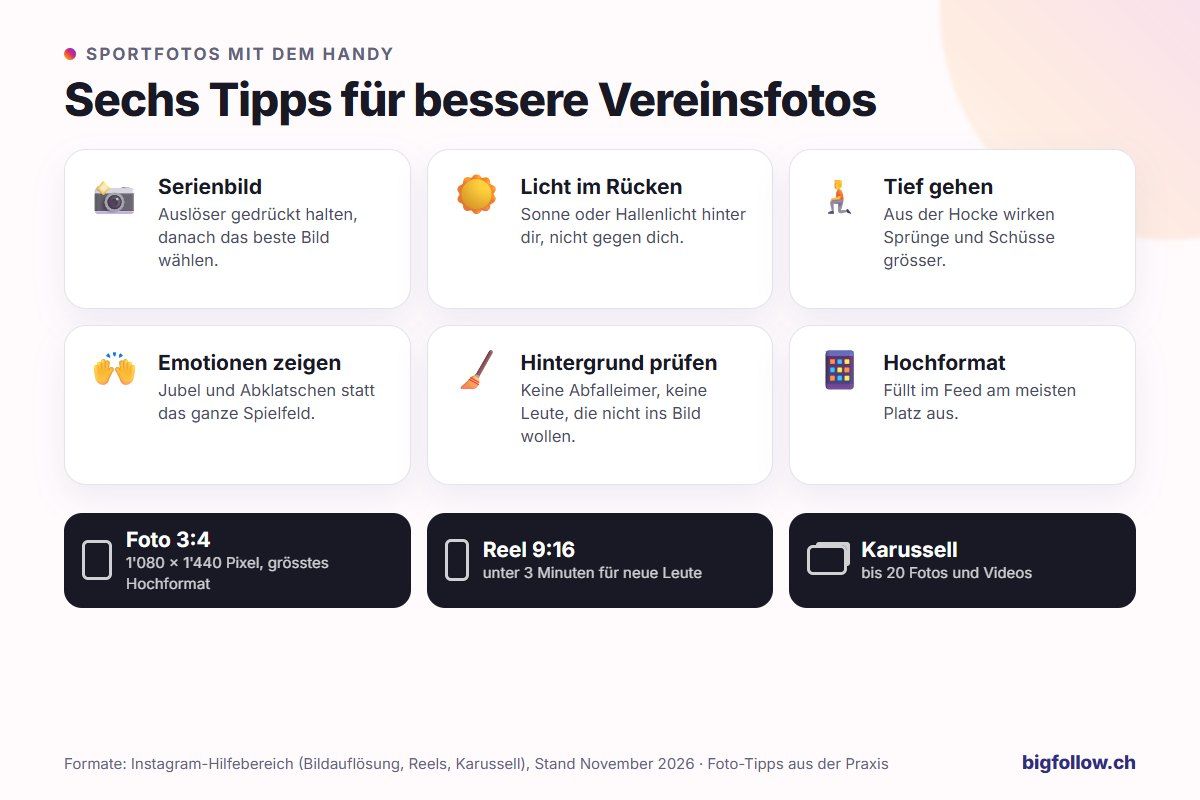
Instagram stores photos with up to 1'080 pixels in width and an aspect ratio between 1.91:1 and 3:4. So the largest portrait format is 1'080 × 1'440 pixels.
For Reels, shoot videos in portrait orientation 9:16. Stay under 3 minutes, otherwise Instagram won't recommend the Reel to new people. More on this in What is a Reel on Instagram? Which music a club account can use in a Reel is explained in Which music can I use on Instagram?
Data Protection and Image Rights: What Can an Association Post?
In Switzerland, every person has a right to their own image. According to the Federal Data Protection and Information Commissioner (FDPIC), you generally need the consent of people who are recognizable in a photo. Here's what that means for associations:
- Group photos: It's enough if everyone knows they're being photographed and where the images will appear (Instagram, website, flyer). Anyone who objects won't be shown.
- Images of individual people: The person must be able to see the photo beforehand and know in what context it will appear.
- Children and young people: For minors, you also need parental consent.
- Withdrawal: Consent can be withdrawn at any time. The image must then be removed.
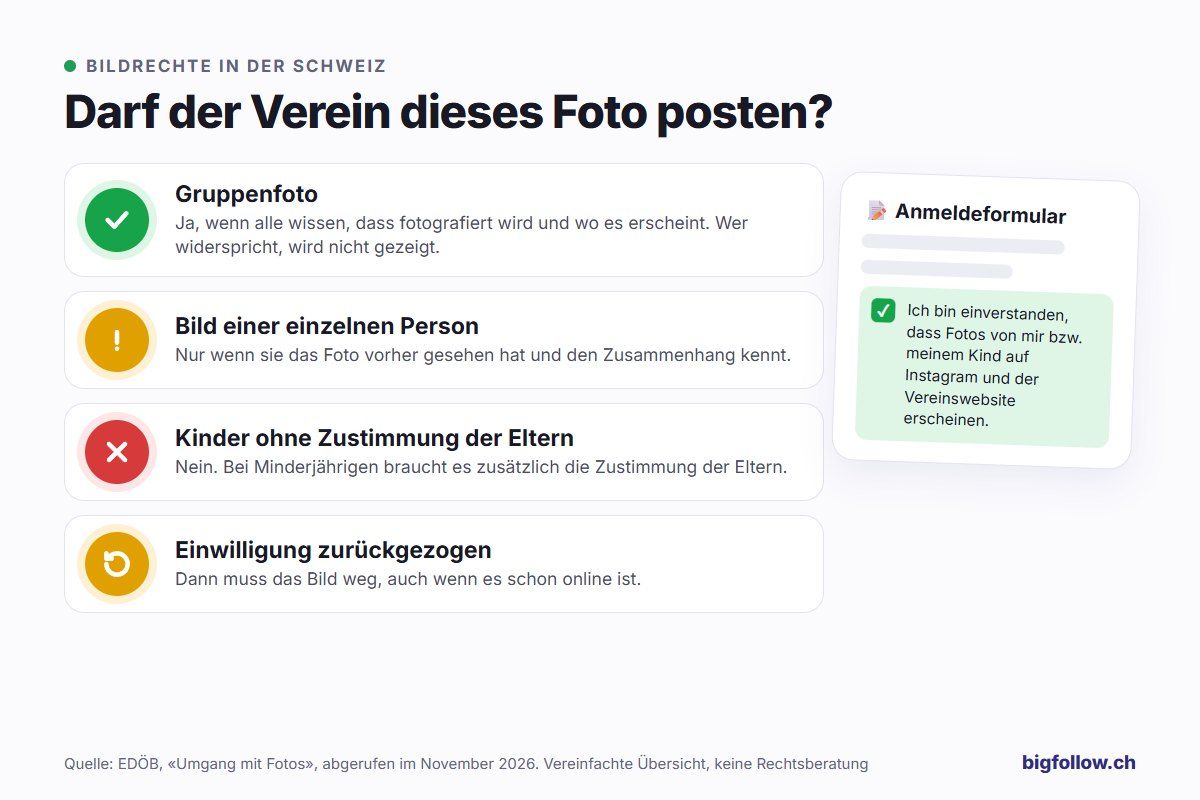
The easiest way to handle this is in your registration form: A checkbox saying "I consent to photos of me/my child appearing on Instagram and the association's website" creates clarity for everyone. Keep a list of who doesn't want to be photographed and share it with everyone who posts for the association.
How Much Time Does Social Media Take in an Association?
There's no fixed amount—it depends on the frequency. It stays manageable if you plan once a week instead of searching spontaneously for content every day. This breakdown helps:
- One person responsible, two or three provide photos and information (coaches, juniors, board members).
- Plan once a week: Instagram lets you schedule posts and Reels directly in the app, up to 30 days in advance and up to 25 per day (Instagram help for scheduling). Collab posts cannot currently be scheduled.
- Stories spontaneously: What happens on game day goes straight into the story.
You can see when your followers are online in your account's statistics. For starters, the calculator below helps with typical times for Switzerland. More on this in Best Time for Instagram Posts.
Conclusion: Start Small, Keep Going
Social media works for associations when you honestly show what's happening in your club and do it regularly. Start with an Instagram business account, a simple weekly plan, and consent in your registration form. After three months, check your statistics to see which posts performed best, and do more of those.
FAQ on Social Media for Associations
Which Instagram account is right for associations?
A business account is the right choice for associations. Instagram recommends it for organizations, businesses, and service providers; the creator account is intended for individuals. Both are professional accounts with statistics and a contact button, and both are always public. You can change your account type later whenever you want, even back to a personal profile.
What social media ideas are there for associations?
Proven ideas include results and previews of games, short training Reels, member portraits, behind-the-scenes looks at events, and thanks to sponsors and volunteers. A carousel with up to 20 images works well for tournaments, and a Collab post works well for joint events with sponsors or other associations.
How often should an association post on Instagram?
Two to three posts per week plus stories on game day are manageable for most associations. The fixed rhythm is more important than the quantity. Plan your posts once a week in advance, and Instagram will publish them automatically at the time you choose.
How does an association win new members with social media?
Show how training works and who participates, and make it easy to join: link to a trial session in your bio, training times in your profile, and regularly mention it in your posts. Ask members to share your posts in their stories. That way, their followers will also see what's happening in your association.
Can associations post photos of children?
Yes, but only with parental consent. The FDPIC explicitly requires this for images of minors. The easiest way is to get written consent when registering and note where the images will appear. If parents withdraw their consent, you remove the images.
Bigfollow
Social media team
BigFollow is the social media shop of PortalWeb GmbH in Altdorf, Switzerland. Since 2022 we have delivered followers, likes and views with a focus on quality so that profiles really grow. Our social media team writes the guides and tutorials on the blog.
Learn more about Bigfollow