
Contents(8)
- 1Where is the bio on Instagram?
- 2How to change your bio on Instagram
- 3How long can the bio be on Instagram?
- 4Link in bio: How to add up to five links
- 5What does "link in bio" mean on Instagram?
- 6What should be in a good Instagram bio?
- 7Conclusion: Your bio is located under your name
- 8FAQ about your bio on Instagram
In a nutshell: Your bio is the short text below your username on an Instagram profile. You'll find it on every profile directly under the profile picture and name. To change your own bio, go to your profile in the app and tap «Edit profile». It has a maximum of 150 characters, and you can add up to five links below it.
A good bio convinces visitors to follow you. Give your profile an initial boost with Instagram followers from BigFollow, without a password.
Where is the bio on Instagram and what should you put in it? You constantly see "Link in bio" on Instagram; it refers to the link in the short text below a profile's username, the Instagram bio. Here you'll see where to find it, how to change your own, and get ideas for the text.
Where is the bio on Instagram?
The bio appears on every Instagram profile directly below the profile picture and username. Open any profile by tapping a username: the short text below the name is the bio. If there's an address below it, that's the link in the bio.
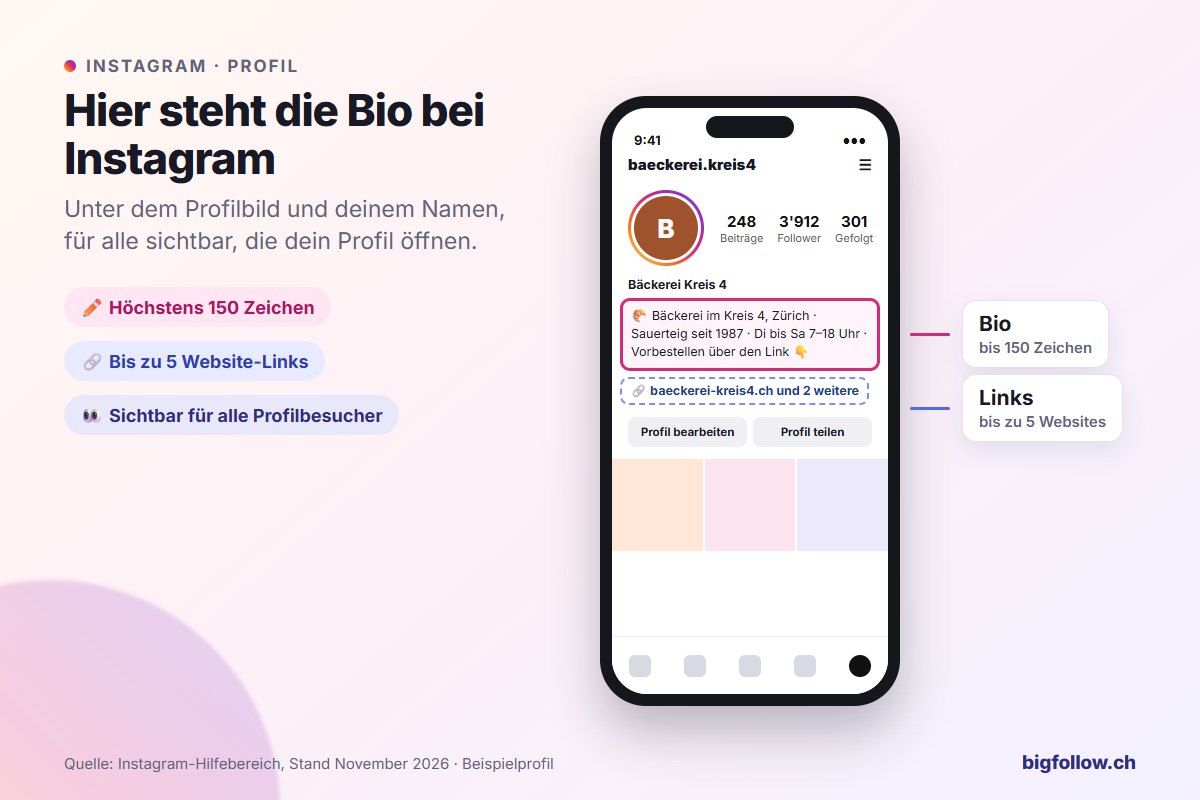
You'll find your own bio the same way: tap your profile picture in the bottom right, and you'll see your profile the way others see it. According to Instagram, anyone can read your bio, even if your account is private and they don't follow you.
How to change your bio on Instagram
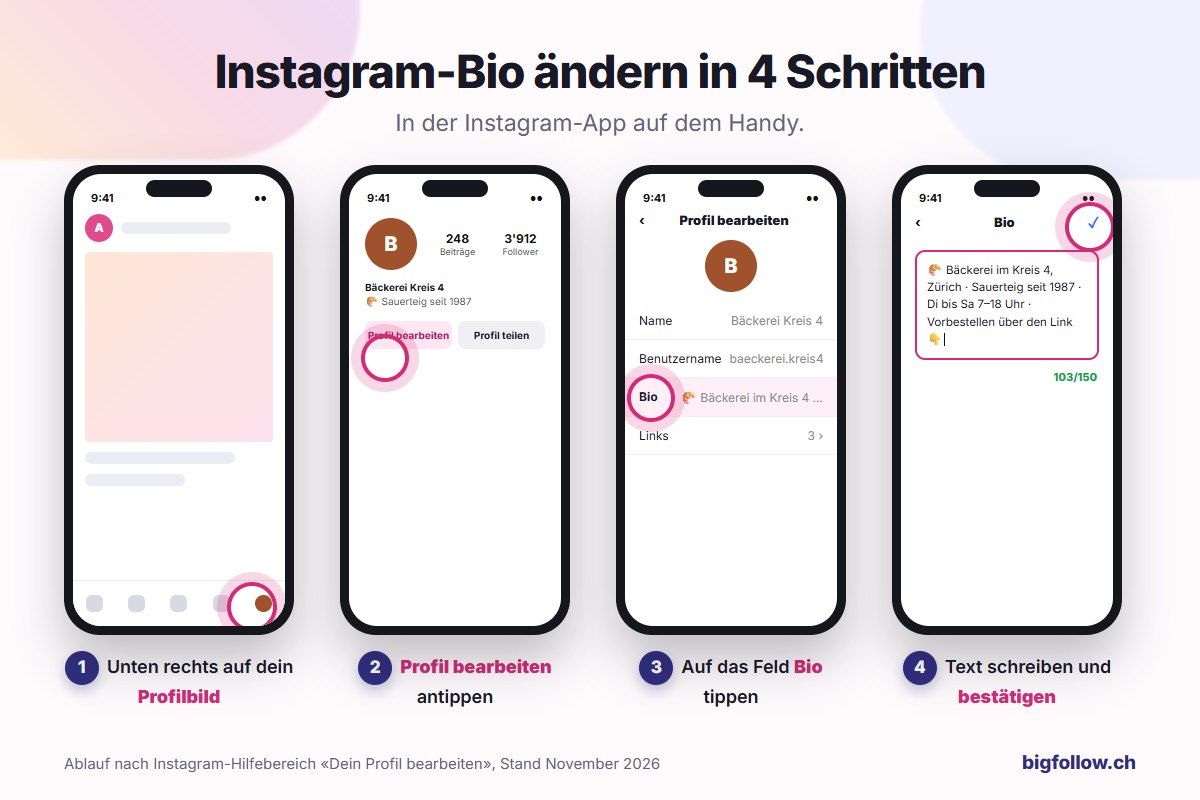
In the app it takes less than a minute:
- Tap your profile picture in the bottom right to open your profile.
- Tap Edit profile.
- Tap the Bio field.
- Write your text and confirm in the top right. Your new bio will then appear in your profile.
Change bio on computer
On instagram.com, click your profile picture on the left, then click Edit profile at the top and the text field next to Bio. Enter text and click Submit, as described in the Instagram Help Center.
How long can the bio be on Instagram?
The Instagram bio can be up to 150 characters long. That's about two short sentences. On TikTok you only get 80 characters, as you can read in Where is the bio on TikTok?.
Since space is limited, it's worth checking every word. You can add a keyword related to your topic in the Name field, for example "Lena | Pasta Recipes". The name appears in bold above the bio and stands out first.
Link in bio: How to add up to five links
Every Instagram account can add up to five websites to its profile. Here's how to do it in the app:
- Open your profile and tap Edit profile.
- Tap Links and then tap Add external link.
- Enter your website address and tap Done.
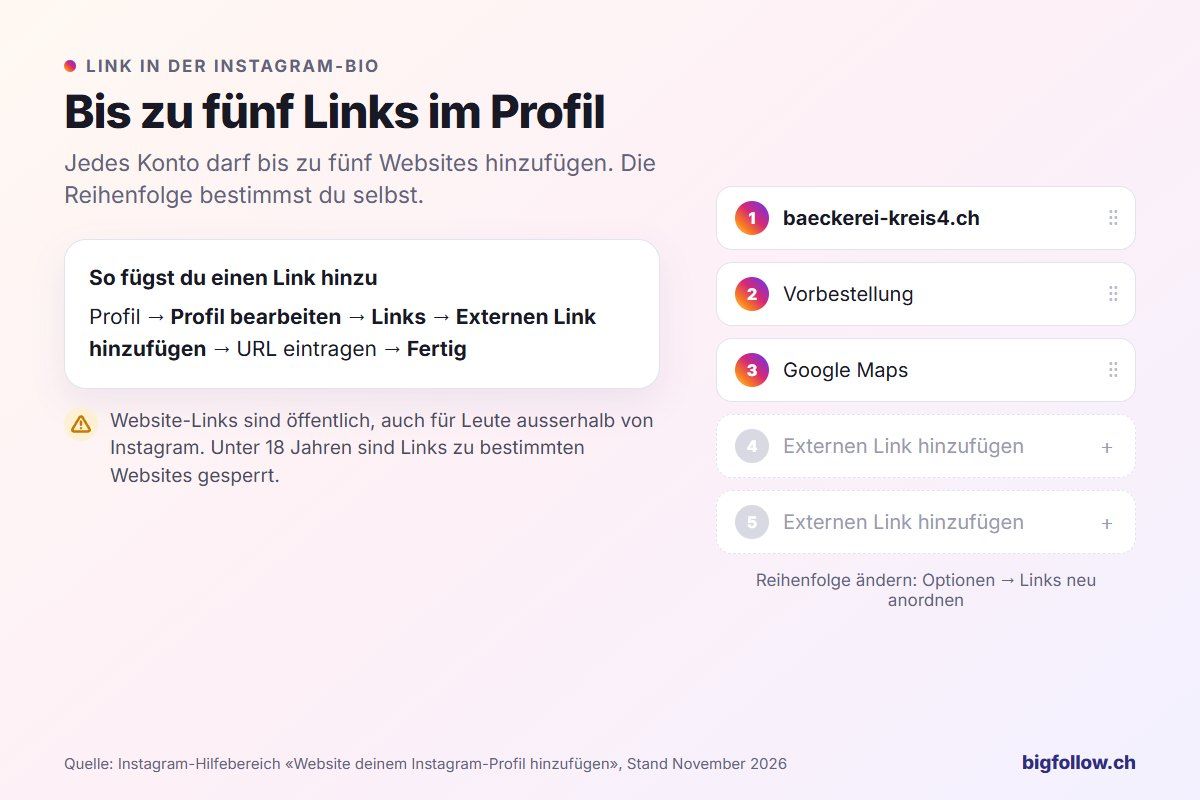
Change the order under Edit profile → Links → Options → Reorder links. Keep in mind two things according to Instagram: your links are public, even for people outside of Instagram. And for teenagers under 18, links to certain websites are blocked.
What does "link in bio" mean on Instagram?
"Link in bio" means: you can find the link to the topic in the person's profile, under their bio. Creators write this under posts and Reels when they want to refer to a website, a shop, or a recipe. If you tap on the name above the post, you'll land in the profile and see the link directly under the bio.
If someone has added multiple links, you'll see them as a list, in the order that the account has set.
What should be in a good Instagram bio?
A good bio tells you at a glance what you do, who you do it for, and what visitors should do next.
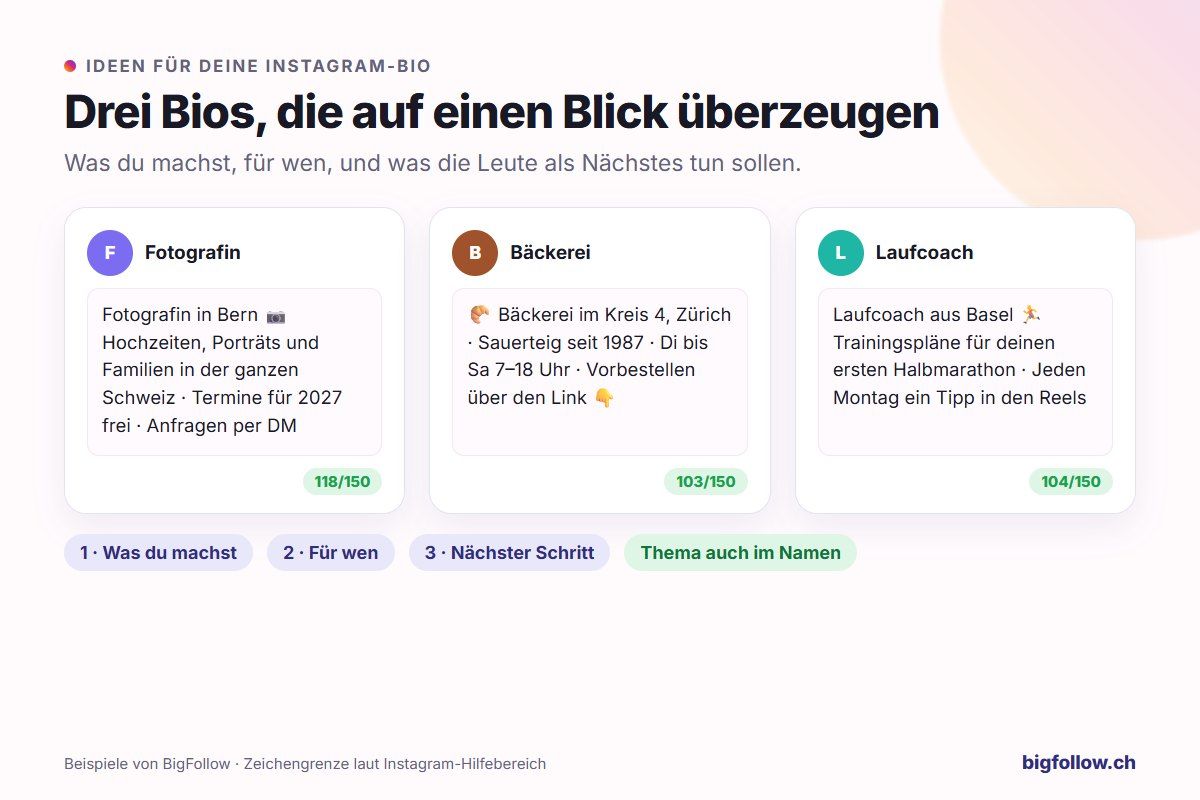
- What you do: Your profession, topic, or offer, preferably with location («bakery in district 4, Zurich»).
- Who you reach: Who do you want to reach? («for your first half marathon»).
- Next step: What should visitors do? («ask via DM», «pre-order via the link»).
- Personality: One or two emojis add a nice touch, but a chain of emojis can look cluttered.
You can tell if your bio is working by how many profile visitors follow you afterwards. You can find which numbers Instagram shows you in Can you see who visited my Instagram profile? And how to turn visitors into more followers is explained in How do I get 10'000 followers on Instagram?
Conclusion: Your bio is located under your name
The Instagram bio is in every profile under the profile picture and name. You can edit it via «Edit profile» and have 150 characters of space, plus up to five links. Take the time to write a clear sentence and a next step for your visitors.
FAQ about your bio on Instagram
Where can I find the bio on Instagram?
The bio is in every profile directly under the profile picture and name. For your own bio, tap on your profile picture in the bottom right. For others, open the profile via search or by tapping on the name above a post.
What does bio mean on Instagram?
«Bio» is short for biography. It refers to the short introduction text in your profile where you say who you are and what you have to offer. More information about the meaning and examples can be found in the post «What is the Instagram bio?».
How many characters does the Instagram bio have?
A maximum of 150 characters. That's enough for two short sentences. It's best to plan your text beforehand, as every word counts. You can add a keyword about your topic in the name field as well. Links don't count towards your bio; they have their own field.
How many links can I add to my Instagram bio?
Up to five websites. You can add them under Edit profile → Links → Add external link and change the order whenever you want. Visitors will see the links in the order you set.
Can I edit my Instagram bio on my computer?
Yes. On instagram.com, click on your profile picture on the left, then on Edit profile and on the bio field. After making changes, click Send. Your new bio will then appear in the app as well.
Bigfollow
Social media team
BigFollow is the social media shop of PortalWeb GmbH in Altdorf, Switzerland. Since 2022 we have delivered followers, likes and views with a focus on quality so that profiles really grow. Our social media team writes the guides and tutorials on the blog.
Learn more about Bigfollow