
What Does DM Mean on Instagram? Your Guide to Private Messaging
What Does DM Mean on Instagram? Your Guide to Private Messaging
Kurzantwort und Kaufhinweis ergänzt
Contents10
- "Write me a DM!" - What does that actually mean?
- The simple answer: What does "DM" actually mean?
- Where can I find my DMs? Your way to the inbox
- How to send your first DM: a step-by-step guide
- Jana and Timo: A DM conversation in everyday life
- What can a DM do? Much more than just texting!
- The "secret" functions: Vanish mode and one-time photos
- The future is here: What is Meta AI in chat?
- FAQ: Frequently asked questions
- Conclusion: "DM" is the key to private conversations
"Write me a DM!" - What does that actually mean?
You're on Instagram, see a cool post and read the sentence in the comments or in a story: "If you have any questions, just send me a DM!". And you're already pondering: What does dm mean on instagram? Is this a secret function? Do I need an extra app for this? And how do I send such a "DM"?
If you've ever asked yourself these questions, you've come to the right place. The abbreviation "DM" is one of the most frequently used words on Social Mediabut it is not always immediately clear to beginners what is behind it.
In this article, we'll explain what a DM is, where you can find it and all the incredibly cool things you can do with it, simply and without any complicated terminology. After reading it, you will not only know, what does instagram dm meanbut also how to use the function like a pro.
The simple answer: What does "DM" actually mean?
Let's start from the beginning. The answer is super simple:
DM stands for «Direct Message«.
In German, this means nothing other than "Direct message" or simply "private message". So it's the private chat area of Instagram. Think of it like the SMS function on your cell phone or a WhatsApp chat, but directly in the Instagram app.
A DM is a private conversation between you and one or more others Users. Everything you write or send there is not visible to the public, but only to the people in the respective chat.
Where can I find my DMs? Your way to the inbox
Okay, now you know what a DM is. But where is this chat area hidden? That's also very easy to find.
- Open the Instagram app.
- Look at your home page (where you see the posts of the people you follow).
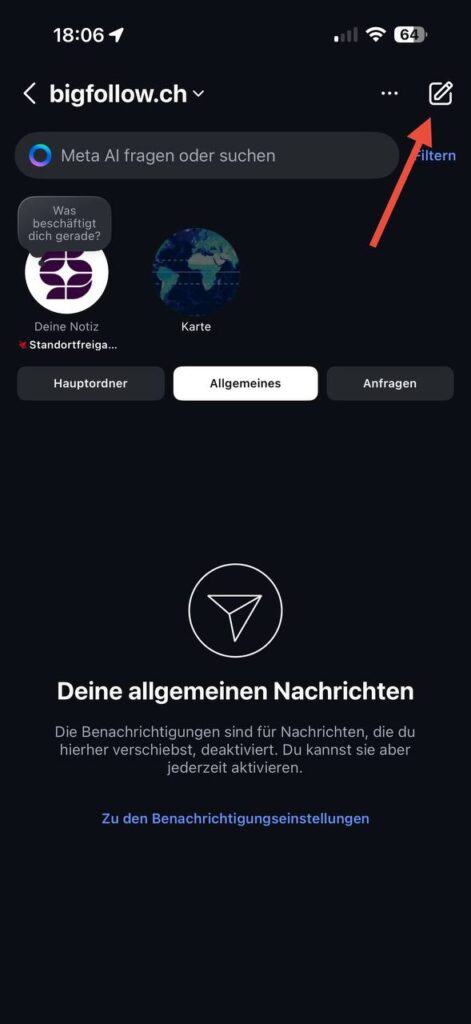
- In the top right corner you will see an icon that looks like a paper airplane. Sometimes it is also a speech bubble.
- Tap on this symbol.
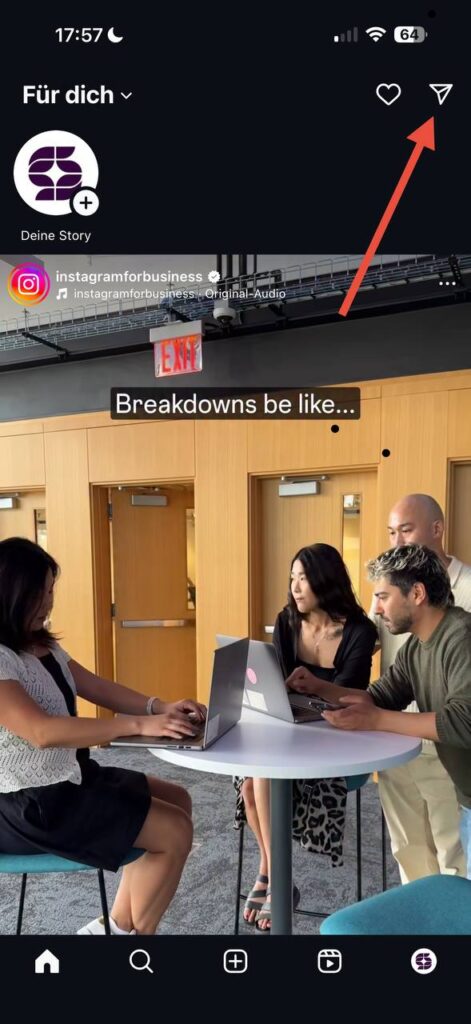
Voilà! You are now in your inbox for Direct Messages. Here you can see all your previous chats.
Your inbox: main folder and requests
Your inbox has two sections:
- Main folder: This is where all News of people you follow.
- Inquiries: If someone writes to you who you don't follow, their message will first end up in the "Requests" folder. This is a protective filter from Instagram so that you are not spammed by strangers. You can then decide whether you want to accept or delete the message.
How to send your first DM: a step-by-step guide
Sending a private message is child's play. There are several ways to reach your destination.
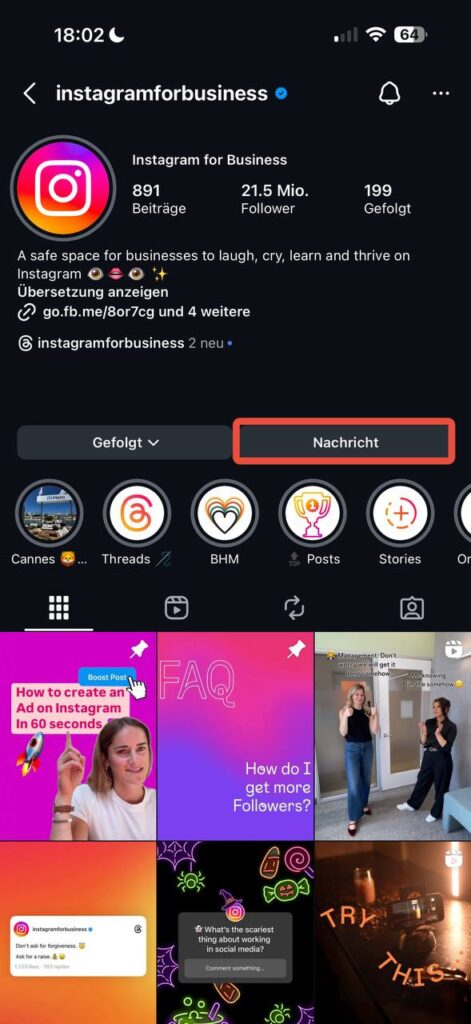
Way 1: Via the user's profile
- Go to the Instagram profile of the person you want to write to.
- Directly below the bio you will see a button labeled "Message«.
- Tap on it, write your message and press "Send".
Way 2: Via your inbox
- Go to your DM inbox (via the paper airplane).
- Tap on the pen-and-paper icon in the top right-hand corner to create a new message.
- Enter the name of the user you want to write to in the search bar, select them and tap on "Create chat".
Jana and Timo: A DM conversation in everyday life
Jana sees in her friend Timo's story that he has a new puppy. She is totally thrilled. Instead of leaving a public comment, she replies directly to the story. This reply automatically becomes a DM to Timo. He is delighted and sends her a short, sweet video of the puppy directly in the chat. Jana responds with a heart GIF. Later they create a Group chat with another friend to plan a meeting in the park. That's how simple and versatile a DM conversation can be!
What can a DM do? Much more than just texting!
Instagram chat is a real all-purpose weapon. You can do much more here than just write text messages.
- Send photos and videos: Send pictures and videos from your gallery or record new ones directly.
- Record voice messages: Press and hold the microphone icon and speak a message - perfect if you don't feel like typing.
- Send GIFs and stickers: Make your chats funnier and more emotional with a huge selection of animated GIFs and stickers.
- Share posts and reels: Have you seen a cool post? Tap on the paper airplane below and send it directly to a friend in the DMs.
- Start video calls: You can start a video call with one person or even an entire group directly in the chat.
- Create group chats: Plan your next trip or chat with several friends at the same time in a group chat.
- Share location: Let your friends know where you are.
The "secret" functions: Vanish mode and one-time photos
Instagram also has a few special functions for more privacy.
- Vanish mode: This is a self-deleting chat. If you activate it (swipe up in the chat), all messages disappear after they have been read and the chat has been closed. Attention: If someone takes a screenshot here, you will both be notified!
- Single-view photos: You can take a photo directly with the chat camera and send it so that the recipient can only view it once. After that, it destroys itself. A screenshot is also reported to the sender here.
The future is here: What is Meta AI in chat?
Perhaps you have already noticed a new contact in your DMs: Meta AI. This is an artificial intelligence assistant that you can write to like a normal contact.
What does that mean for you? You can use the Meta AI ask all kinds of questions. She's like a super-smart encyclopedia right in your chat.
- "Give me some recipe ideas for a quick dinner."
- "Explain quantum physics to me very simply."
- "Show me funny cat reels."
- "Write me a short poem about summer in the Alps."
This tool will change the way we News and information on Instagram will change significantly in the future. You can also find out more in the official newsroom of Meta.

FAQ: Frequently asked questions
Can I delete a sent Instagram DM?
Yes, this is a super useful function. If you have sent a message that you regret, simply press and hold your finger on the message. Then select "Recall" off. The message then disappears not only from your account, but also from the other person's chat. But beware: the person may have already read the message.
Can anyone send me a DM?
No, you can set this yourself. In your privacy settings, you can specify whether anyone can send you a message or only people you follow. As explained above, messages from strangers end up in the "Requests" folder anyway.
What does the heart symbol next to a message mean?
This is simply a quick reaction, a "like" for a message. Instead of writing "Okay" or "Great", you can simply double-tap on a message to add a heart to it. If you hold your finger on a message for longer, you can also react with other emojis.
Conclusion: "DM" is the key to private conversations
You see, the answer to the question "what does dm mean on instagram" is quite simple: they are your private News. But behind this simple abbreviation lies an incredibly powerful tool with countless functions.
One Direct Message is the place for personal conversations, funny inside jokes, quick arrangements and direct contact with your favorite creators or even companies. From simple texts, voice messages and video calls to chats with artificial intelligence such as Meta AI - the DMs are the beating heart of communication on Instagram.
Now you know what is meant when someone says: "Write me a DM!" So, be brave, tap the paper airplane and discover the world of private messages.
For the featured snippet: The abbreviation "DM" on Instagram stands for "Direct Message". It is the app's private chat function that allows users to send private messages, photos, videos and voice messages to one or more people without them being visible to the public.
Bigfollow
Bigfollow has been the leading Swiss provider for social media growth, follower packages, likes and engagement boosts since 2022.